Stop paying Klaviyo for profiles that stopped engaging
Scan your account for free with a read-only key. You see who has not opened, clicked, visited or bought, which buyers are protected, and the lower plan you could reach. Nothing changes until you approve it.
- The free scan cannot change anything in Klaviyo
- Your key is never stored
- Backup file and undo for every run
Step 1 of 4
Connect with a read-only key
- In Klaviyo, open Settings, API keys and press Create Private API Key.
- Choose Read-Only Key, or a Custom Key with
accounts:read,profiles:read,metrics:readandevents:read. - Paste it here. It starts with
pk_.
Step 2 of 4
Reading your account
Starting...
Large accounts take a few minutes. Keep this tab open. Only read calls are made in this step.
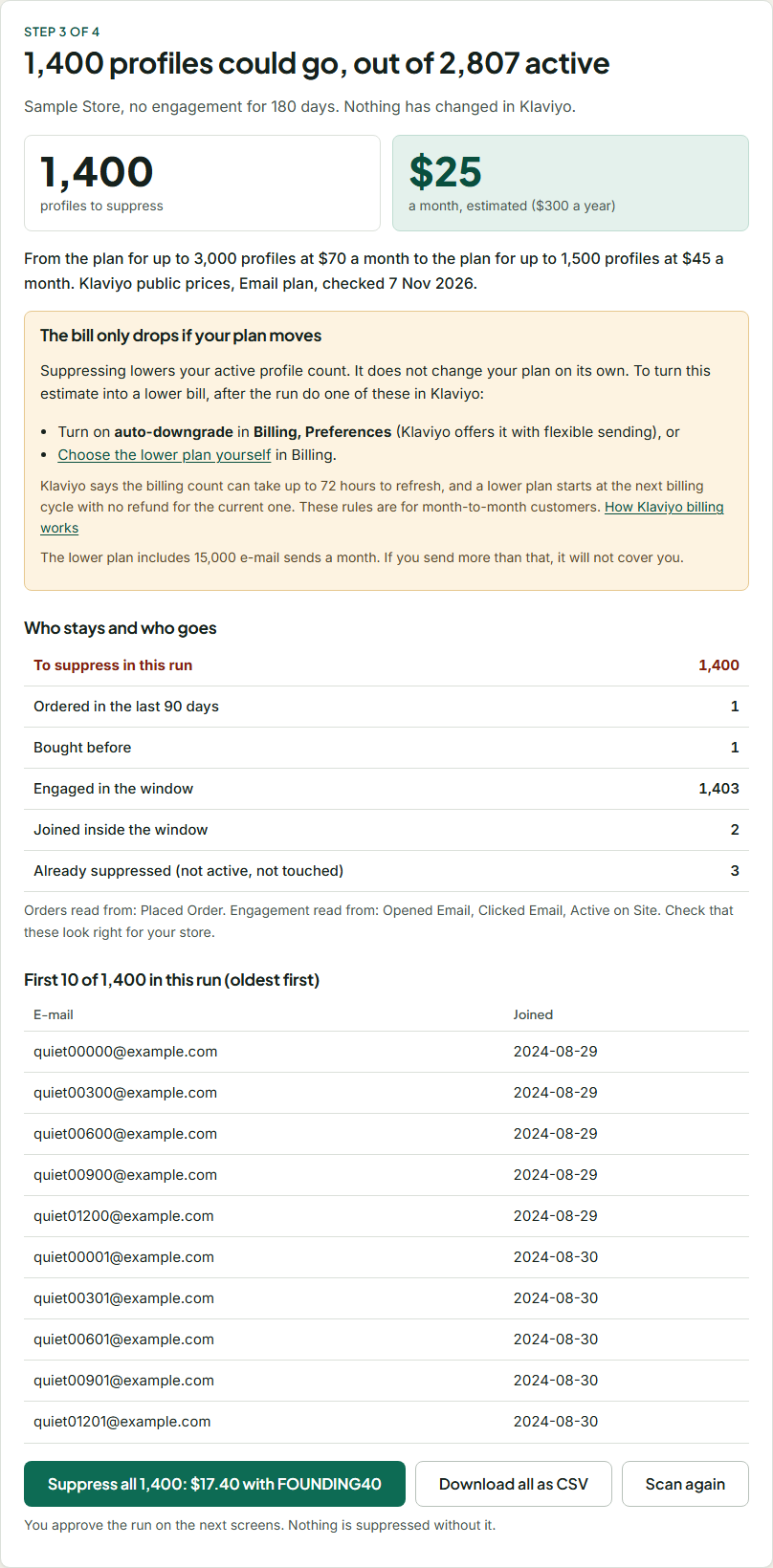
Step 3 of 4
The bill only drops if your plan moves
Suppressing lowers your active profile count. It does not change your plan on its own. To turn this estimate into a lower bill, after the run do one of these in Klaviyo:
- Turn on auto-downgrade in Billing, Preferences (Klaviyo offers it with flexible sending), or
- Choose the lower plan yourself in Billing.
Klaviyo says the billing count can take up to 72 hours to refresh, and a lower plan starts at the next billing cycle with no refund for the current one. These rules are for month-to-month customers. How Klaviyo billing works
Who stays and who goes
First profiles in this run
| Joined |
|---|
Step 3 of 4
Unlock suppressing
One Klaviyo account for 12 months of runs. Tax may be added at checkout. 14-day refund.
Your licence key. Save it now; we do not ask for your e-mail to send it again.
Step 3 of 4
Approve this run
Suppressed profiles stop getting marketing e-mail, even if they buy later, until you remove the suppression. Nothing is deleted. Klaviyo suggests trying to win people back first.
- Save the backup file. It is what undo reads.
Saved
Step 4 of 4
Suppressing
Keep this tab open. If it closes, finished batches stay done; scan again to continue with the rest.
Step 4 of 4
Now lower the bill
- Check the count in Klaviyo Billing. It can take up to 72 hours to refresh.
- Turn on auto-downgrade in Billing, Preferences, or choose the lower plan yourself. Without one of these your plan stays the same.
- Come back next month and scan again. This version does not run by itself, because that would mean storing your key.
Undo an earlier run from its backup file
Free, always, with or without a licence. We only restore e-mails the file marks as suppressed by this tool. Klaviyo removes only suppressions it lists as USER_SUPPRESSED; unsubscribes and bounces stay as they are. Klaviyo reference
How it works
- Scan. We read your profiles, your order events and your opens, clicks and site visits for the window you pick. With a read-only key the scan cannot change anything.
- Check. See the count, the plan before and after from Klaviyo's public prices (checked ), each protected group and every profile in a CSV. This part is free.
- Approve. Save the backup, paste a key that can write and type the number. We send the list to Klaviyo's bulk suppression API in batches of 100 and check each job.
- Lower the plan. Turn on auto-downgrade or pick the lower plan in Klaviyo Billing. Then scan again next month.
You can do all of this by hand in Klaviyo: a segment, bulk suppression and a plan change are built in and free, and our guide shows how. This tool is for when you want the buyer check, the saving before you act, a backup and a one-click undo. Need a quick number first? Try the calculator.
What is protected by default
| Profile | What happens |
|---|---|
| Ordered in the last 90 days | Never suppressed. You cannot turn this off. |
| Bought at any time | Kept. You can turn this off to include older buyers. |
| Opened or clicked an e-mail, visited the site, viewed a product, added to cart or clicked a text in the window | Kept. The window is 90, 180 or 365 days; 180 by default. |
| Joined inside the window, or no join date | Kept. They have not had time to engage. |
| Already suppressed, unsubscribed or bounced | Not touched, and undo leaves them as they are. |
| Over the limit for one run | Waits for a later run. 5,000 by default, and never more than half of your active profiles at once. Oldest first. |
If we cannot find order events, or no opens or clicks come back for the window, the scan stops and shows no result. Those are the cases where a wrong list would be most likely. Orders count when they reach Klaviyo as Placed Order, Ordered Product or Fulfilled Order events, so this works for any store that sends those.
Suppression is for e-mail. It does not change text message consent.
Pricing
$29 one time
FOUNDING40 takes 40% off until 30 November 2026 ($17.40). It is applied for you at checkout.
- One Klaviyo account for 12 months of runs. It does not renew.
- The scan, saving estimate, CSV and undo stay free.
- 14-day refund. Refund policy
- You start each run yourself. Nothing runs without you, because we do not store your key.
If your numbers do not reach a lower plan, the result screen says so before you buy. Tax may be added at checkout.
Questions
Does suppressing delete anything?
No. The profiles and their history stay in Klaviyo. They stop counting as active once Klaviyo has processed the suppression.
Is my API key safe with you?
It stays in this tab's memory and travels to our server over HTTPS for each call, which passes it to Klaviyo and drops it. We do not store it and logging is switched off for this service. Make a separate key for this run and delete it in Klaviyo when you are done.
Do you keep my customers' e-mail addresses?
No. They pass through our server to your browser and are not stored. The CSV is made in your browser and saved on your computer.
Why two keys?
So that the free scan cannot change your account. Only the run needs write access.
What if a run stops halfway?
Finished batches stay done and the receipt lists each profile as done, failed, not attempted or to check. Scan again to continue: profiles already suppressed are left out.
Has this been run on a live Klaviyo account?
Not yet. It has been tested end to end against a simulated Klaviyo built from Klaviyo's published API schema, including paging, rate limits, failures and undo, but it has not been run on a real Klaviyo account. Start with a small limit on your first run and check the result in Klaviyo. Questions go to support@atesensoftware.com.