Can you bulk edit invoices in Xero?
No, not with Xero alone, going by its own help. Xero Central describes editing one invoice at a time: open it, select Edit, change the due date, click Update. The CSV import cannot update an invoice either, because a row whose invoice number already exists is not imported. Checked on 15 November 2026.
Tell me when it works The manual steps
This page asks whether we should build a pay-once tool that changes due dates in bulk. That tool does not exist yet and nothing is promised.
What Xero lets you edit on an invoice
| Invoice | What you can change | How many at a time |
|---|---|---|
| Draft | Any field. Xero saves the changes automatically. | One. You open the invoice. |
| Awaiting payment, no payment applied | Any field, through the menu icon, Edit, then Update. | One. You open the invoice. |
| Paid or partly paid | To, Due date, Invoice number, Reference, Branding theme, Description, Account, Tracking and Project, without removing the payment. Other fields need the payment removed first. | One. You open the invoice. |
| Imported from a CSV file | Nothing on an invoice that exists. The import adds new draft invoices. | Xero recommends no more than 500 items in one file. |
Rows one to three: Xero Central, Edit an invoice. Row four: Xero Central, Import customer invoices. Both checked 15 November 2026. Neither article describes a way to edit several invoices at once.
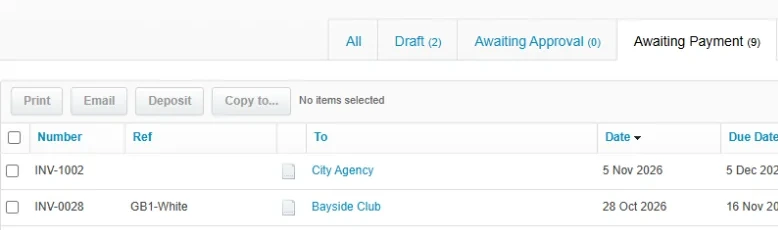
How to change the due date on an invoice in Xero
These are Xero's steps for an invoice that is awaiting payment. You repeat them for every invoice.
- Open the invoice list. In the Sales menu, select Invoices.
- Open the invoice. Find the invoice and open it.
- Start editing. Click the menu icon, then select Edit. A draft invoice has no Edit step: you change it directly.
- Change the due date. Enter the new date in the Due date field.
- Save. Click Update. A draft invoice saves automatically.
Where this stops:
- One invoice per round. Forty invoices with the wrong due date means forty rounds of open, Edit and Update.
- Your customer is not told. Xero does not notify the customer when an invoice changes. The online invoice shows the new date, and a PDF you already sent has to be sent again.
- Paid invoices. Due date is one of the fields Xero lets you change on a paid or partly-paid invoice without removing the payment.
- The default due date is for new invoices. Xero Central describes the default as the date Xero enters each time you add an invoice. It describes no effect on invoices you already have.
The Duemend guide Bulk change due date in Xero covers the same job for bills as well as sales invoices.
Why the CSV import does not solve it
Importing a corrected file looks like the shortcut. Xero's import article rules it out in three statements:
- It adds, it does not update. "If an invoice number in the file already exists in Xero, that invoice won't be imported."
- A new number makes a second invoice. Imported invoices arrive as drafts. A row with a number Xero has not seen becomes a new draft invoice, and the original keeps its old due date.
- Files are small. Xero recommends no more than 500 items in a single file, and each row is one invoice line.
The import template does have a DueDate column, in the format DD/MM/YYYY. It sets the due date of the invoices the file creates.
What we are considering building
A tool for one job, paid once per job:
- Pick invoices by filter. Contact, status, invoice date range or current due date range.
- Set the new due date. One fixed date, or a shift such as 14 days later.
- Preview every change. The old and the new due date of each invoice, before anything is written to Xero.
- A file to restore the old dates. Every invoice with the due date it had before the run.
It would run on the same Xero connection as our app Unapprove, so an organisation that already uses Unapprove would not connect a second app.
| Job size | Planned price, one-off |
|---|---|
| Up to 100 invoices | $29 |
| Up to 1,000 invoices | $49 |
| Up to 10,000 invoices | $99 |
Planned prices in US dollars. Nothing is on sale here and the prices can change.
This tool does not exist yet. Your answer decides whether we build it.
If the dates have to move this week, our separate app Duemend changes due dates on many Xero invoices or bills in one job today. It connects to Xero on its own and is sold as a 7-day pass or a monthly plan on its own site. The question on this page is whether a pay-once price inside Unapprove would suit you better.
Tell us how many invoices need a new due date
Two answers and an e-mail address. We write once, when the tool works or when we decide not to build it.
Questions people ask
Can you bulk edit invoices in Xero?
Not with Xero alone, going by its help. Xero Central's Edit an invoice article describes opening one invoice, selecting Edit, making the changes and clicking Update. It describes no way to edit several invoices at once, and the CSV import does not import a row whose invoice number already exists.
How do I bulk change the due date in Xero?
Xero's own steps change one invoice at a time: Sales, Invoices, open the invoice, menu icon, Edit, change the due date, Update. To change many in one job you need an app that connects to Xero. Our app Duemend does that today. The pay-once tool described on this page is not built.
Can a Xero CSV import update existing invoices?
No. Xero Central says each invoice in the file must have a unique invoice number, and that an invoice whose number already exists in Xero will not be imported. The import creates new draft invoices.
Can you change the due date on a paid invoice in Xero?
Yes. Xero Central lists Due date among the fields you can edit on a paid or partly-paid invoice without removing the payment, together with To, Invoice number, Reference, Branding theme, Description, Account, Tracking and Project.
Does changing the default due date in Xero change existing invoices?
Xero Central describes the default due date as the date Xero enters each time you add an invoice, unless the contact has its own due date. The article describes no change to invoices that already exist, so plan to edit those one by one.
Sources, checked 15 November 2026. Xero Central: Edit an invoice, Import customer invoices and Set due dates for invoices, bills and quotes.
Atesen Software is independent and not affiliated with Xero. Xero is a trademark of Xero Limited, and this page is not endorsed by Xero. Menus and options can change.
Questions about this page: support@atesensoftware.com.