Unapprove vs Bulkdozer vs Bulk Void vs SaasAnt
Three apps bulk void approved invoices in Xero: Unapprove (free preview, then $39 a month or a one-off $49 pass for 30 days), Bulk Void for Xero (first 5 invoices free, then $29 once per organisation) and Bulkdozer (free). Xero itself voids awaiting payment sales invoices one at a time, though it voids bills in bulk from the list. Unapprove can also make editable draft copies before it voids the originals, and SaasAnt Transactions documents bulk deletion from files.
Start free preview with Xero Or connect Xero and start the $49 Clean-up Pass
You sign in with Xero first. The preview needs no card and changes nothing. Paid checkout is on Paddle after you connect.
The four tools side by side
Every cell below comes from the tool's own pages, opened on 14 November 2026. Where a page says nothing, the cell says so.
| Unapprove | Bulkdozer | Bulk Void for Xero | SaasAnt Transactions | |
|---|---|---|---|---|
| How it runs | Web app. You authorise one Xero organisation through the Xero API. | Web app. You connect on Xero's own sign-in and permission screen. It reads records when you load them and writes when you press Apply. | Chrome extension in your signed-in Xero tab. The vendor says there is no Xero API connection. | Web app that imports, exports and deletes transactions from Excel, CSV or text files. |
| What it voids | Approved sales invoices and bills that are eligible. Void only, or a draft copy first. | Invoices and bills. Draft and submitted ones are deleted, authorised and paid ones are voided. | Sales invoices, Awaiting Payment and Paid. Bills are not listed. | Its pages describe bulk deletes of transactions. Whether approved invoices are voided is not stated. |
| Draft copy of the original | Yes, except US organisations, where copies through the Xero API can lose automatic sales tax. The copy is made first. | Not described on its pages. It edits reference, number, dates, contact and status. | Not described on its pages. | Not described on its pages. |
| Paid invoices | A separate run removes payments, then voids. Reconciled and batch payments are never removed. An allocated credit note is skipped. | Deletes the payment first, removes credit note allocations, then voids. | An option removes each payment, then voids. It skips an invoice with a credit note, batch payment, overpayment or prepayment. | Its Xero guide names bulk edit and delete for misapplied payments. Rules for paid invoices are not stated. |
| Picking the batch | Filters, or paste or upload exact invoice numbers. | Filters on text, contact, status, dates, amount and currency. | Filter the sales invoice list in Xero, then run on that list. | A file you upload. |
| Before it writes | A read-only preview with a reason for each skipped document, a CSV backup, then you type the count. | A review screen with counts and an optional CSV of the changes. Each record is rechecked just before writing. | A dry run, a CSV backup that must be saved first, then you type the count. | Imports map your file headers first. A preview for deletes is not described. |
| Undo | A void cannot be undone. The draft copy is a new document. | No undo for applied changes, and it keeps no backup of your records. | A void is permanent in Xero, so the backup is the record. | "Undo Import" rolls back an import. Its guide says voided documents cannot be undone. |
| Price Checked 14 Nov 2026 | Free preview and 3 documents in a 14-day trial. Per organisation: $39/month, $290/year or $49 once for 30 days. Tax is added at checkout. Unapprove plans. | Free. The vendor mentions possible premium features. Bulkdozer pricing statement. | First 5 invoices free. Limited founding price: $29 once per organisation ($49 regular). Five organisations cost $99 once. 14-day refund. Bulk Void licence terms. | 30-day free trial. Manual: $15/month or $90/year. Automation: $25/month or $150/year. SaasAnt's policy excludes refunds. SaasAnt Xero plans. |
| Users and rating shown | No user count or rating on its pages. | None on the pages read. | Chrome Web Store listing: nine users, no ratings yet, version 1.1.2. | Its Xero page says over 50,000 professionals use it and shows 4.8 out of 5 badges without naming a source. |
Sources checked 14 November 2026. Bulkdozer: home page, help and privacy policy. Bulk Void: product page, Chrome Web Store listing and privacy policy. SaasAnt: Transactions for Xero, Xero pricing and its void vs delete guide (1 September 2025). Xero: Delete or void an invoice and Delete or void a bill. Unapprove: pricing.
Which one fits the job
- Void sales invoices, nothing else, at no cost: Bulkdozer is free and also edits references, numbers and dates in a grid. Bulk Void is a one-off licence if you prefer to work inside your own Xero browser tab.
- Void paid invoices: Bulkdozer, Bulk Void and Unapprove each remove the payment first. They differ on what they skip, so read the skip rules in the table before you run a batch that has credit notes or batch payments.
- Unapprove, meaning a draft you can edit and approve again: this is the job Unapprove was built for. It makes the draft copy, keeps the number where Xero allows and voids the original. The other three pages do not describe it.
- Bills, or a list of invoice numbers in a spreadsheet: Unapprove takes bills and exact numbers pasted or uploaded. Bulkdozer handles bills too. SaasAnt works from files and suits teams that already import transactions with it.
A void is permanent in Xero, whichever tool runs it. Keep the backup, and test on a small batch first.
What Unapprove shows before it voids
Screens from the product, run on a Xero demo company. The preview changes nothing; the run log lists what happened to each document.
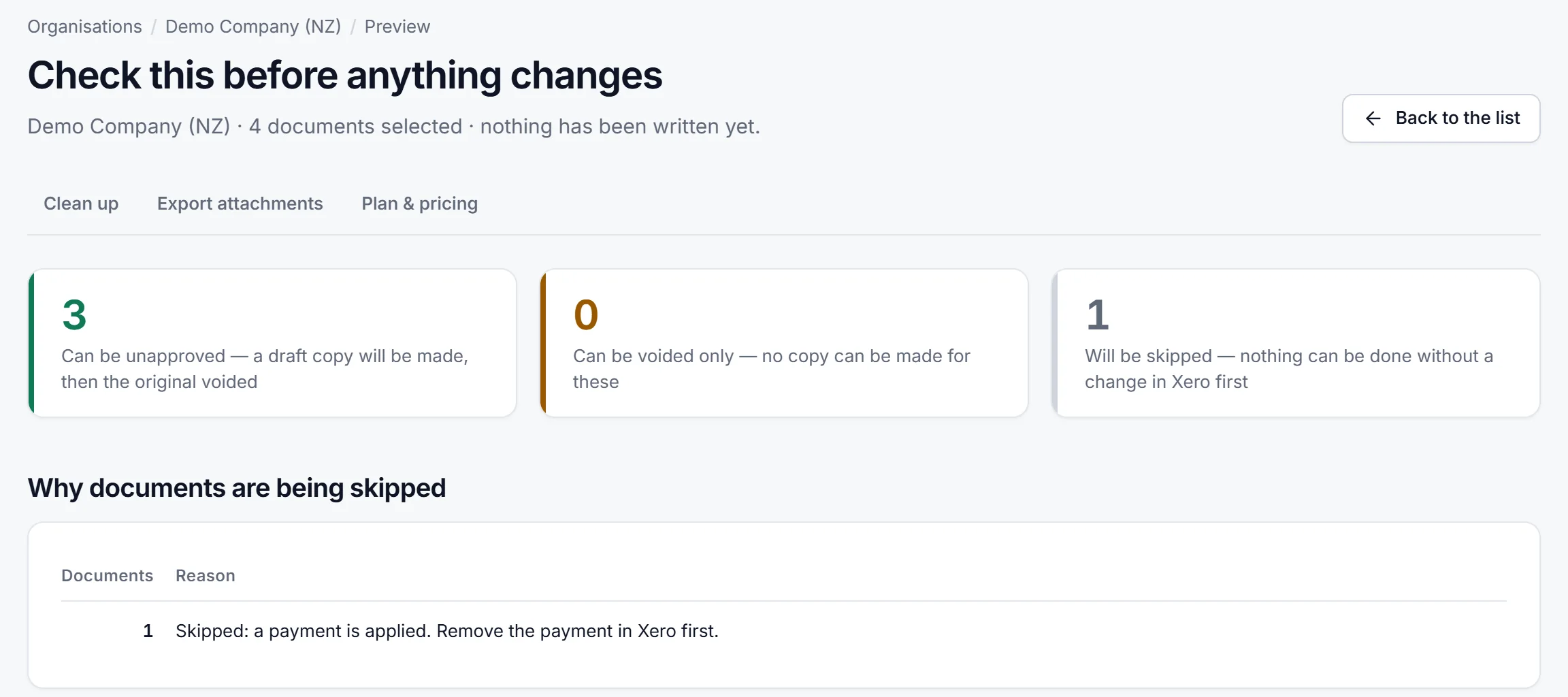
Preview before anything changes: what can be unapproved, voided only or skipped, and why.
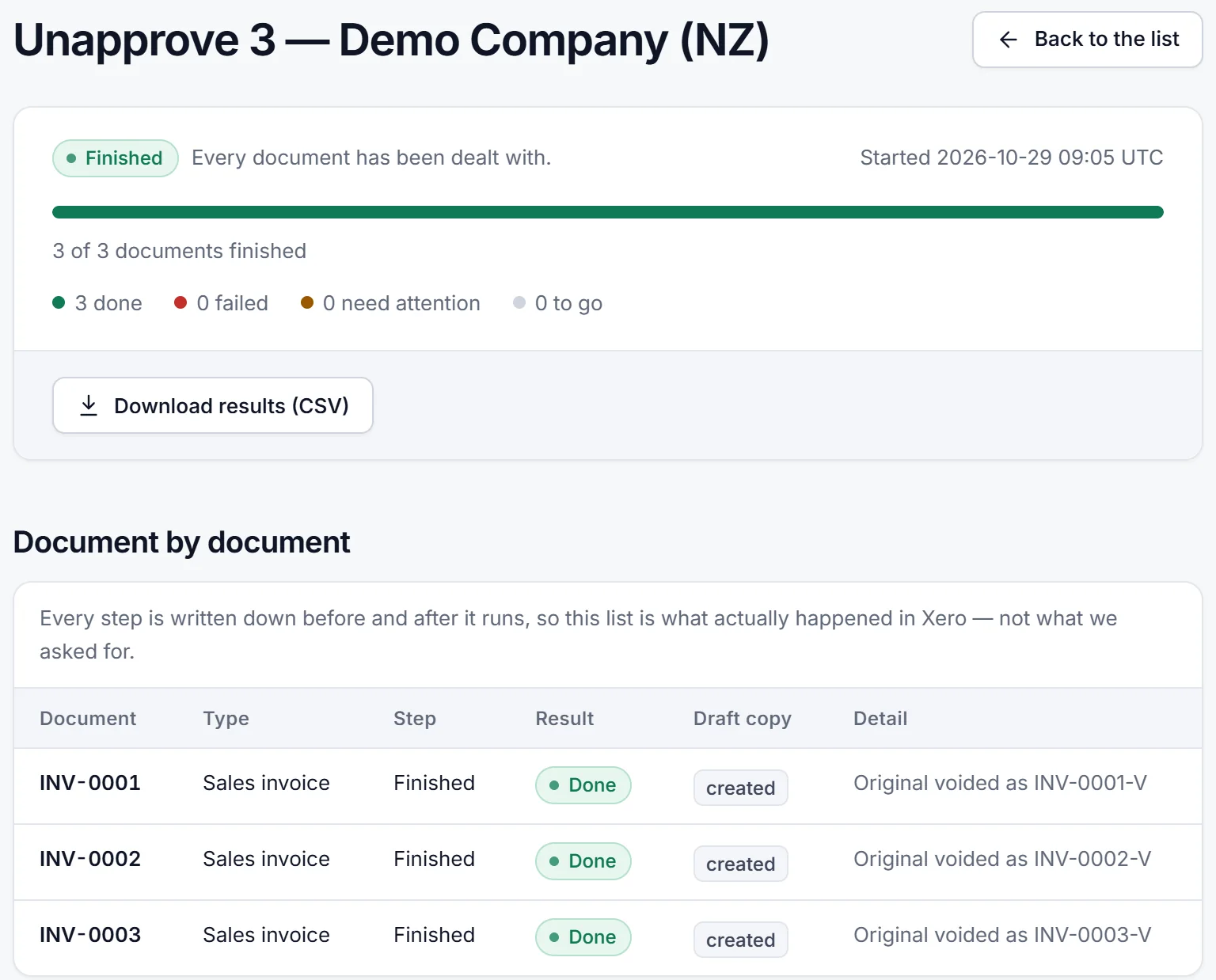
Run log: each document, its result and the draft copy, with a CSV download.
Paid invoices have their own confirmed run in Unapprove: remove the payment and void. For the manual steps, see the guide on how to void an invoice in Xero and the page on voiding and copying by hand. For a batch, see the guides on how to bulk unapprove invoices in Xero and how to void multiple approved invoices at once.
Questions before a clean-up
Which app bulk voids approved invoices in Xero?
Unapprove, Bulk Void for Xero and Bulkdozer each void a batch of approved invoices. Unapprove has a free preview, then costs $39 a month or $49 once for 30 days. Bulk Void is $29 once per organisation after 5 free invoices. Bulkdozer is free.
Can Xero void invoices in bulk without a tool?
Not for Awaiting Payment sales invoices. Xero Central says you cannot void them in bulk and need to void them individually, and that a paid invoice needs its payment removed before you can void it. Draft and awaiting approval invoices can be deleted in bulk, and bills awaiting payment can be voided in bulk.
Which of these tools void paid invoices?
Bulkdozer, Bulk Void for Xero and Unapprove each remove the payment and then void. Unapprove does it in a separate confirmed run and never removes a reconciled or batch payment. SaasAnt's pages do not say how it treats paid invoices.
Which one is free?
Bulkdozer says it is free and that premium features may come later. Bulk Void gives the first 5 invoices free. Unapprove lets you preview any number of documents and process 3 in a 14-day trial. SaasAnt has a 30-day trial. Prices were read on 14 November 2026, so check each page before you buy.
Can a bulk void be undone?
No. Xero says voided invoices cannot be reinstated or restored. Download the backup CSV each tool offers, and run a small batch first. Unapprove creates the draft copy first, and if the copy fails the original is left as it was.
Looking at BulkOps for Xero? Its site, opened on 14 November 2026, lists credit note allocation, payment runs and an attachment export, and says it never deletes invoices or bills, so it does not bulk void. For the attachment side, see BulkOps for Xero alternatives for attachment export.
See a real Unapprove demo preview or check the current plans. FOUNDING40 takes 40% off the first payment until 30 November 2026. An unused Unapprove pass is refundable within 14 days.
Atesen Software makes Unapprove. This comparison uses only the public pages of Bulkdozer, Bulk Void for Xero and SaasAnt, opened on 14 November 2026; features and prices can change, so check their pages before you decide. Atesen Software has no affiliation with them or with Xero. Xero is a trademark of Xero Limited.