How to bulk void approved invoices in Xero, hundreds at once
Xero can void bills in bulk from the Awaiting Payment list, but not sales invoices. Xero Central says: "You can't void awaiting payment invoices in bulk, you need to void them individually" (Delete or void an invoice, checked 14 November 2026). Unapprove bulk voids a selected batch after a free preview, for $39 a month or $49 once.
How do I delete hundreds of invoices in Xero at once?
Drafts and invoices awaiting approval can be deleted in bulk: on either tab, select the checkboxes, then click Delete. Approved invoices cannot be deleted, only voided, and Xero voids awaiting payment sales invoices one at a time. For hundreds, Unapprove voids up to 500 pasted or uploaded invoice numbers in a batch, after a free preview.
What Xero does in bulk and what it does not
The rules depend on status (Xero Central: Delete or void an invoice, and Delete or void a bill).
| Status | What Xero allows | In bulk? |
|---|---|---|
| Draft | Delete | Yes. Tick the invoices on the Draft tab, then click Delete. |
| Awaiting approval | Delete | Yes, the same way from the Awaiting Approval tab. |
| Awaiting payment | Void | No. Xero says to void them individually. |
| Paid or part-paid | Remove the payment, then void | No. Each one is voided individually. |
| Bills awaiting payment | Void | Yes. Tick the bills on the Awaiting Payment tab, then click Void. |
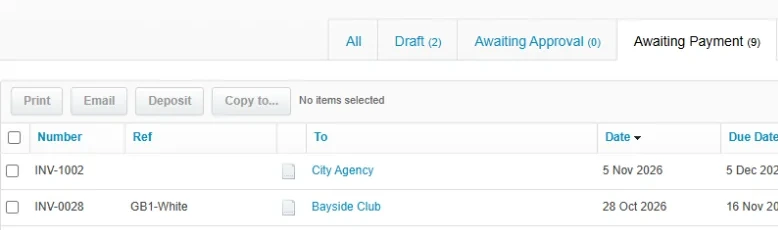
How to void approved invoices one at a time in Xero
A void cannot be undone, so go in this order.
- Find the invoice. In the Sales menu, select Invoices, then the Awaiting Payment tab, or the Paid tab for a paid one. Open the invoice.
- Remove any payment. Click Less payment, then Options and Remove & Redo. Xero warns that a payment deleted this way can't be restored. The invoice returns to awaiting payment (Delete an invoice or bill payment).
- Remove an overpayment, if one is applied. Click Overpayment, click the remove icon next to the amount credited, then OK.
- Change the number if you want to reuse it. Xero Central says to reuse the number of an approved invoice, you need to change it before you void the invoice.
- Void it. Click the menu icon, select Void, then click Void to confirm.
- Check the result. Voided invoices can't be reinstated or restored, but they show on the All tab of Invoices when you tick Include Deleted & Voided.
The single-invoice version of these steps is in how to void an invoice in Xero.
What gets in the way of a batch void
- Payments. Unapprove skips documents with a payment. Its separate remove-payments run never removes a reconciled payment or one inside a batch payment. To unreconcile many payments first, see can you bulk unreconcile in Xero.
- Credit notes. Unapprove skips a document with an allocated credit note on a regular run.
- A lock date. Users can't add or edit transactions dated on or before it, and an administrator can change or remove it (Set up or remove lock dates). Unapprove skips a document in a locked period.
- Invoices the customer already has. Xero Central advises a credit note to correct a sent invoice.
For an editable draft after the void, see how to unapprove an invoice in Xero or how to bulk unapprove invoices in Xero.
Option: Unapprove
Unapprove is a web app that voids a selected batch of approved sales invoices and bills after a preview. Its void-only run makes no draft copy. A separate run removes payments and credit note allocations first, then voids. You approve access on Xero's own page.
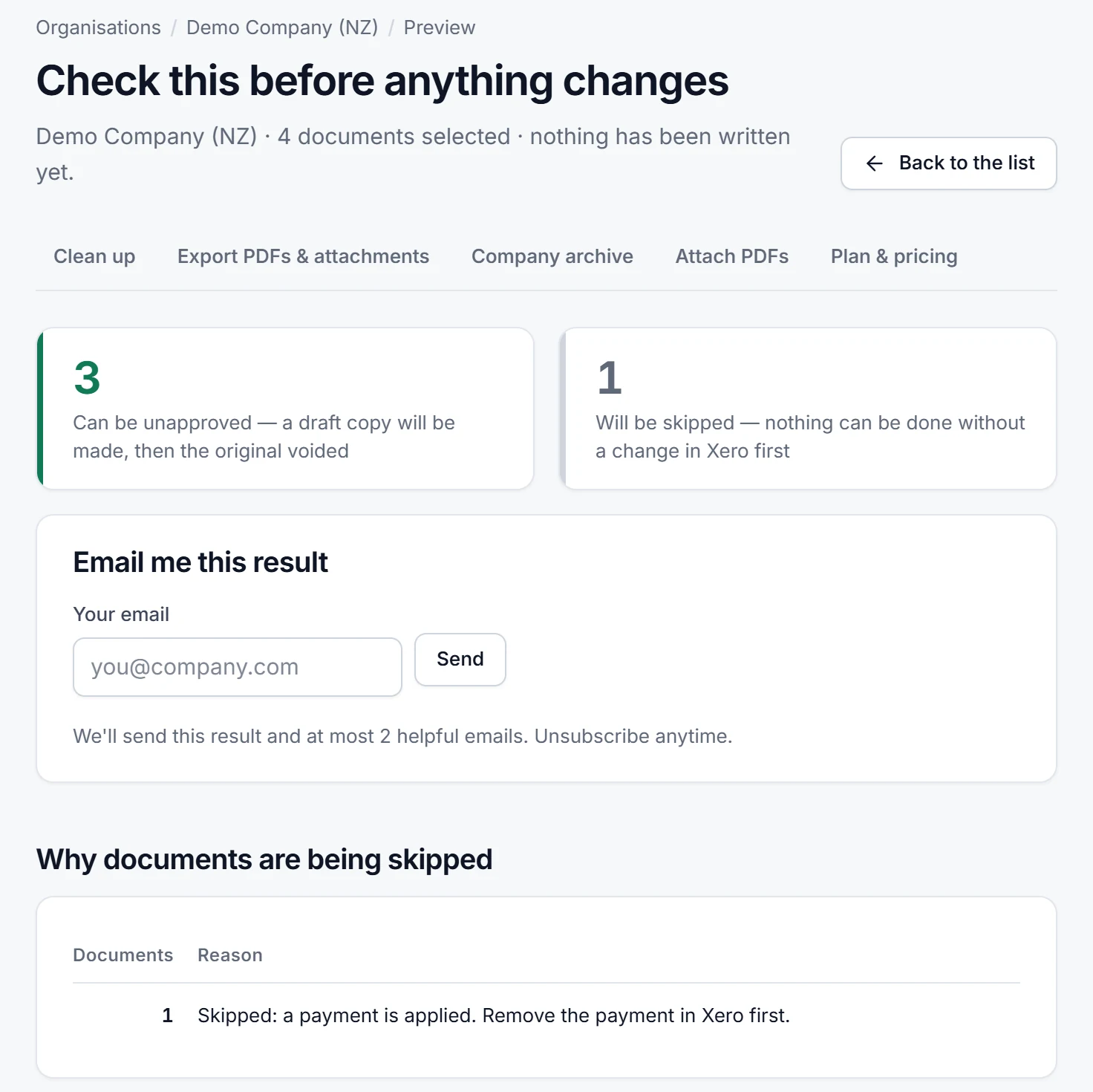
To void a long list, paste or upload the invoice numbers from a CSV or TXT file. Each batch needs its own confirmation. You type the number of documents to confirm, a CSV of the selected documents is saved first, and an interrupted run can be resumed.
Disclosure. Atesen Software, which publishes this guide, makes Unapprove. The manual steps above work without it.
Price. Preview is free. The free trial costs $0, needs no card and processes 3 documents within 14 days. Monthly is $39 per connected organisation. The Clean-up Pass is a one-off $49 for 30 days with unlimited documents and no renewal. Prices exclude tax; see the pricing page for the current plans.
Short on time? We can do the whole clean-up for you for a fixed price.
How the ways to void a batch compare
| Route | How it runs | Paid invoices | Before it writes |
|---|---|---|---|
| Bulk Void for Xero, a Chrome extension | Inside your signed-in Xero tab, with no Xero API connection, its page says. The first 5 invoices are free, then a one-off licence. | An option removes each payment, then voids. | A dry run, a CSV of the batch saved first, then you type the count. |
| Unapprove, a web app | Through the Xero API once you approve access. | Skipped on a void-only run. A separate run removes payments, never reconciled or batch ones. | A preview with a reason for each skipped document, a CSV, then you type the count. |
Bulk Void for Xero: its product page, opened on 14 November 2026, where its price is shown. Bulkdozer and SaasAnt are in the full comparison, Unapprove vs Bulkdozer vs Bulk Void for Xero vs SaasAnt. Bad import? See the SaasAnt alternative.
Which route fits
- A handful of approved invoices: void them by hand.
- A bad import or a batch approved too early: a batch tool with a preview and a CSV.
- Duplicates you have not listed yet: run the free scan in Duplicate Finder, or read how to find duplicate invoices and bills in Xero.
Atesen Software is independent. Xero is a trademark of Xero Limited, and this page is not affiliated with or endorsed by Xero. Xero Central was checked on 14 November 2026; menus and options can change.
Questions about this guide: support@atesensoftware.com.
Questions people ask
Can you bulk void invoices in Xero?
Not natively. Xero Central says you can't void awaiting payment invoices in bulk and need to void them individually. Only drafts and invoices awaiting approval can be deleted in bulk.
Why can't I void a paid invoice in Xero?
You can only void an invoice that is awaiting payment. For a paid invoice, remove the payment first with Remove & Redo, then void it.
How do I bulk void approved invoices in Xero?
Xero voids awaiting payment sales invoices one at a time, so a batch needs a tool. Unapprove voids a selected batch of approved invoices and bills after a free preview. It costs $39 a month per organisation, or $49 once for a 30-day Clean-up Pass.
How do I delete hundreds of invoices in Xero at once?
Drafts and invoices awaiting approval can be deleted in bulk from their tabs: select the checkboxes, then click Delete. Approved invoices cannot be deleted, only voided, and Xero voids them one at a time.
Can a void be undone in Xero?
No. Xero Central says voided invoices can't be reinstated or restored. You can create a new invoice or copy the voided one.