How to change page restrictions on many Confluence pages
Confluence Cloud has no built-in way to change the restrictions on many pages at once. You change them page by page in the Share dialog, or you script the REST API. An app can change a whole page tree after a preview.
What Confluence does on its own
Atlassian's article Change who can find content and what they can do with it covers restrictions on one item at a time. Three rules matter for a bulk change.
- View restrictions flow down. A view restriction on a parent page or folder is inherited by every item nested under it.
- Edit restrictions do not. Atlassian says that restricting editing on a parent does not restrict editing on its children, so each page is set on its own.
- You stay on what you set. Atlassian's Data Center documentation says that when you apply a restriction, Confluence adds you to the list and you cannot remove yourself. The Cloud article does not repeat this, so check it on your own site.
Atlassian's Jira suggestion CONFCLOUD-59659, "Bulk update page restrictions", was still in Gathering Interest when we checked. Its workaround is a REST API script.
The manual route, step by step
This is how to take a person off restricted pages, or swap them for someone else. You need edit access to each page and the space permission to edit restrictions, or a space admin does it.
- Open Space settings, select Content, then Restricted. Atlassian says this lists the restricted pages in the space.
- Open a page and select Share.
- Find the person under Specific access, open their dropdown and select Remove.
- To add their replacement, search for the name and give Can view or Can edit.
- Repeat for the next page. Edit rights need a visit to every page, because they are not inherited.
- Check the person's access afterwards. Atlassian's troubleshooting article explains that permissions are additive. Someone who is also in a group on the page keeps the greater access.
If the account that set a restriction was deactivated or deleted, Atlassian says you need admin-level access, and Premium and Enterprise organisation admins can use the admin key.
The REST API route
The content restrictions endpoints sit at /wiki/rest/api/content/{id}/restriction. In Atlassian's reference, POST adds users and groups and keeps the existing ones. PUT replaces the lists you send, operation by operation, and an empty list clears that list. DELETE removes all read and update restrictions on the page. There are also endpoints for one user or one group.
A script needs the page IDs under your top page, a read of each page's restrictions, a write, and a read back. Test it on a throwaway page first.
Where it runs out
- Hundreds of pages. Replacing one person on 300 pages is 300 visits to the Share dialog.
- A departing employee. Atlassian's space list identifies restricted pages. The articles we read describe no search for the pages one person is restricted to.
- A re-organised space. Moving a branch changes which view restrictions it inherits, as the troubleshooting article notes. Edit restrictions stay on the pages where you set them.
- No preview or undo. The articles describe none for a change across many pages.
Option: Bulk Page Restrictions for Confluence
Disclosure: Atesen Software makes this app. The manual steps above work without it.
You choose a top page. The change covers that page and every page, folder, whiteboard and database below it. You can add, remove or replace a person or group, copy the top page's restrictions down the tree, or remove all restrictions, for view, edit or both.
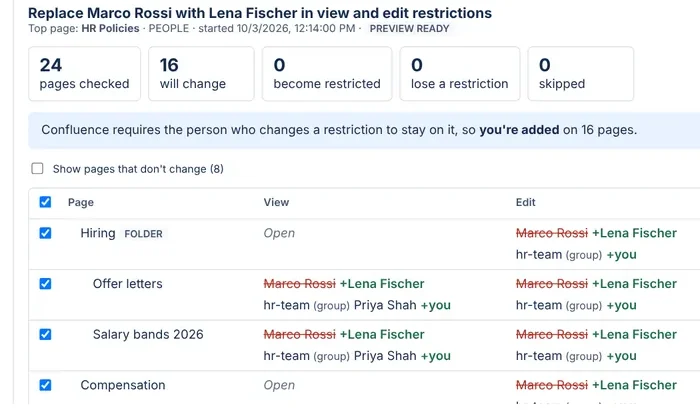
- Preview first. Each page shows who is on its view and edit restrictions now and after the change. You untick the pages to leave alone.
- Checked again before writing. A page whose restrictions changed after the preview is left alone and reported.
- Undo and a record. One click undoes a change. A CSV report lists every page, and changes stay in History for 30 days.
- Your own permissions. Pages you cannot see are not listed, and pages you cannot edit are skipped and reported.
Good to know. It is for Confluence Cloud. Because Confluence requires the person who changes a restriction to stay on it, the app adds you where it writes, shown as "+ you". Removing the last name from a restriction opens that page to everyone with access to the space. Adding someone leaves unrestricted pages open unless you choose otherwise. Pages with 200 or more people or groups in one restriction are left alone. Keep the window open while it runs, and resume from History if it closes.
See the Marketplace listing for current pricing and trial terms. More on the app is on its product page.
Which route fits
- A few pages: the Share dialog.
- Hiding a branch from viewers: a view restriction on its top page. See the guide to restricting child pages.
- You already test and keep scripts: the REST API.
- One person or group changing across a large tree: an app with a preview and undo.
Atesen Software is independent. Atlassian and Confluence are trademarks of Atlassian, and this page is not affiliated with or endorsed by Atlassian. The Atlassian pages and the Jira suggestion cited here were checked on 13 November 2026. Menus and options can change.
Questions about this guide: support@atesensoftware.com.
Questions people ask
Can you change page restrictions in bulk in Confluence Cloud?
Not with a built-in feature. Atlassian's suggestion CONFCLOUD-59659 was in Gathering Interest on 13 November 2026, and its workaround is a REST API script.
How do I remove a user from all page restrictions in a space?
By hand, open each restricted page, select Share and remove the person. A script or an app can do it across pages. Check group membership afterwards, because a person in a group on the page keeps that access.
Do child pages inherit page restrictions in Confluence?
View restrictions are inherited by everything nested under the page. Edit restrictions are not, so each page needs its own.
Why am I added to a restriction when I change it?
Atlassian's Data Center documentation says Confluence adds the person who applies a restriction and that they cannot remove themselves. Bulk Page Restrictions shows this as "+ you" in its preview.
Can I undo a bulk change to page restrictions?
The Atlassian articles we read describe no undo for a change across many pages. Bulk Page Restrictions keeps each change in History for 30 days and undoes it with one click. It leaves alone any page changed again since.