Can you edit an approved invoice in Xero?
Yes. Xero lets you edit an approved invoice that is awaiting payment: open it, click the menu icon, select Edit, change any field and click Update. On a paid or part-paid invoice only some fields change until you remove the payment (Edit an invoice, checked on 15 November 2026). For a batch that is better voided and redone as drafts, Unapprove does it after a free preview.
How to edit an approved invoice in Xero
These steps follow Xero Central's article for the web. With no payment applied, start at step 3.
- Find the invoice. In the Sales menu, select Invoices, then find and open the invoice.
- Remove payments, if the field needs it. On a paid or part-paid invoice, remove any payments, credit notes, prepayments or overpayments before you change a field outside the list below.
- Open the editor. Click the menu icon, then select Edit.
- Make your changes. With no payment applied you can edit any field and drag and drop invoice lines to reorder them.
- Save. Click Update, or click the arrow next to Update to email the updated invoice, get its online link or print the PDF.
- Put back what you removed. Re-apply any payments, credit notes, prepayments or overpayments you took off in step 2.
Xero does not notify your customer of the change. The online invoice updates by itself, but a customer who has the PDF needs the new version from you.
What you can change on a paid invoice
Without removing the payment, Xero Central lists these fields as editable on a paid or part-paid invoice:
- To, Due date, Invoice number and Reference
- Branding theme and Description
- Account, Tracking and Project
You can also attach files and change the payment service after payment. Any other field, such as a quantity, a price or a tax rate, means removing the payment first and re-applying it afterwards. The article warns that GST adjustments on a paid invoice may need a different method, and suggests asking your accountant or bookkeeper if you are unsure.
Where editing stops being the right fix
- A lock date. A lock date stops changes to transactions in a past period. An administrator can change or remove it (Set up or remove lock dates).
- An invoice the customer already has. Xero Central says that if you have already sent the invoice, in some situations it might be better to void it and create a new one.
- Many invoices with the same mistake. The article describes editing one invoice at a time. After a bad import or a sync that approved invoices too early, that is a loop of open, menu, Edit, change, Update for each one, plus removing and re-applying every payment.
To void an invoice instead, see how to void an invoice in Xero. To get one back as a draft, read can you unapprove an invoice in Xero.
Option: Unapprove, for a batch you would rather redo
Unapprove is a web app for Xero users who need to put many approved invoices and bills right at once. You approve access on Xero's own page, filter and select the documents, and see a preview of every result before anything changes.
- Unapprove to draft. It creates a separate draft copy before the original is touched, renames the original with a -V suffix and voids it. Eligible draft copies take over the original number, and supported attachments are copied across. If the copy cannot be made, the original is left as it was.
- Linked history. Each document gets a note naming the other and the number it used to carry.
- Void only. A void-only run for a batch that needs no copy.
- Paid invoices. A separate run removes payments and credit note allocations, then voids. Reconciled and batch payments are never touched.
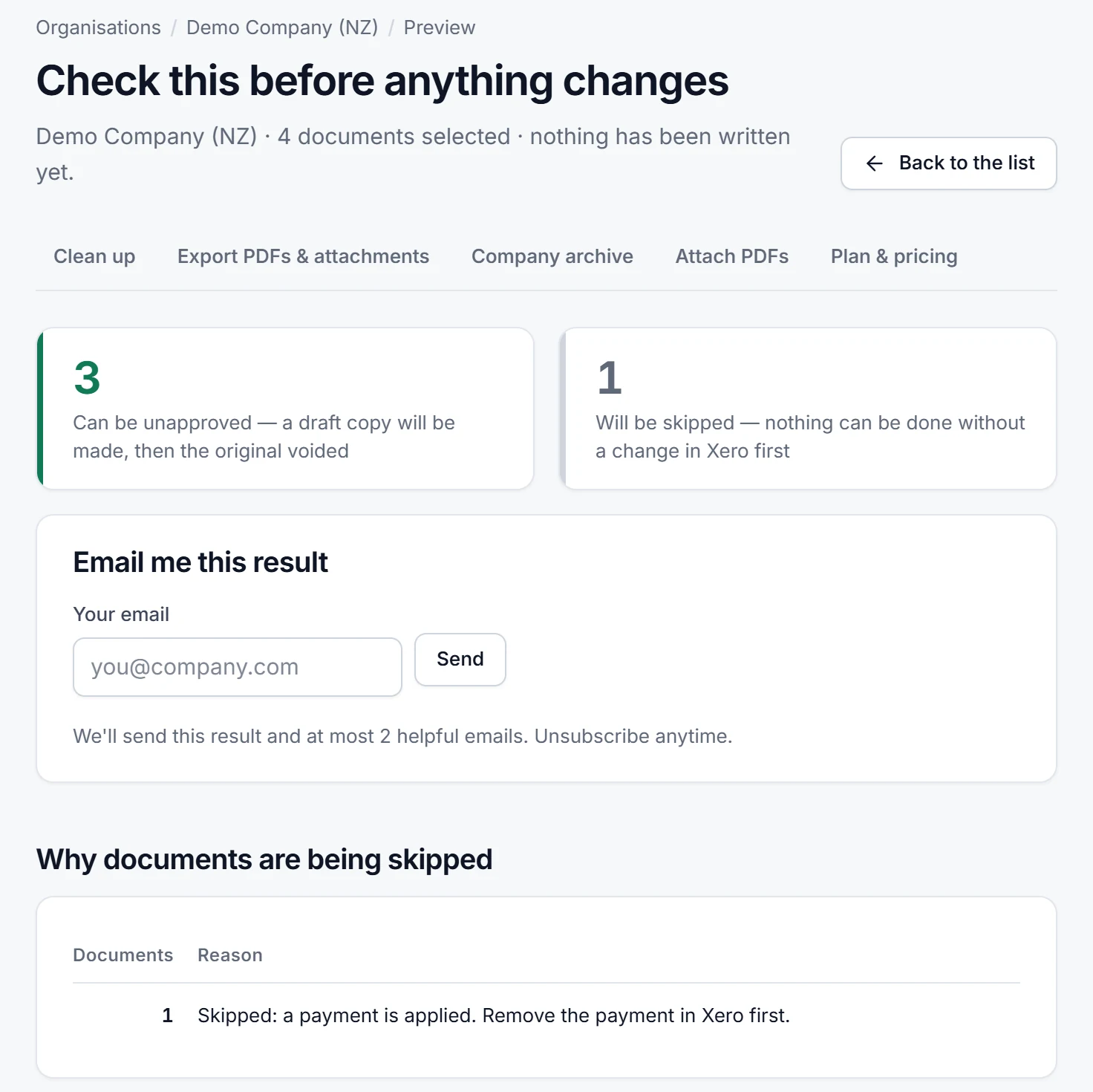
On a regular run, documents with a payment, an allocated credit note or a date in a locked period are skipped and listed with the reason. You edit the draft copies in Xero and approve them again yourself.
Disclosure. Atesen Software, which publishes this guide, makes Unapprove. The steps above work without it.
Price. Preview is free. The free trial costs $0, needs no card and processes 3 documents within 14 days. Monthly is $39 per connected organisation, or $290 a year. The Clean-up Pass is a one-off $49 for 30 days with unlimited documents and no renewal. Prices exclude tax; see the pricing page.
Which route fits
- One invoice with no payment: Edit in Xero, then send the customer the new PDF.
- One paid invoice and a field in the list above: Edit, no payment removal needed.
- A batch that needs fresh drafts with the same numbers: how to bulk unapprove invoices in Xero.
- A batch that should not exist at all: how to void multiple approved invoices in Xero at once.
- Only the due dates are wrong: changing due dates in bulk.
Atesen Software is independent. Xero is a trademark of Xero Limited, and this page is not affiliated with or endorsed by Xero. Xero Central was checked on 15 November 2026; menus and options can change.
Questions about this guide: support@atesensoftware.com.
Questions people ask
Can you edit an approved invoice in Xero?
Yes. Open the invoice, click the menu icon, select Edit, make your changes and click Update. With no payment applied, any field can change.
Can I edit a paid invoice in Xero?
Partly. To, Due date, Invoice number, Reference, Branding theme, Description, Account, Tracking and Project can change without removing the payment. For any other field, remove the payment, edit, then re-apply it.
Why can't I edit an invoice in Xero?
The usual reasons are a payment or credit note on the invoice, which blocks most fields, or a lock date that covers the invoice date. An administrator can change or remove the lock date.
Does Xero tell my customer when I edit an invoice?
No. The online invoice updates automatically, but Xero does not notify the customer. If they have the PDF, send them the new version.
How do I fix many approved invoices in Xero at once?
Xero edits them one at a time. Unapprove makes draft copies of a selected batch and voids the originals after a free preview, for $39 a month per organisation or $49 once for a 30-day Clean-up Pass.