Can you import leads into HubSpot?
Yes, in two steps with HubSpot alone. Import the people as contacts, then select those contacts on the Contacts index and click Create leads. HubSpot's import articles, checked on 15 November 2026, never name the Leads object as something you import from a file, and the Create leads panel takes one pipeline, stage, type and label for every contact selected.
HubSpot's steps One file, linked leads
What HubSpot's own help describes
In HubSpot, a lead is a potential customer, and HubSpot's article Create leads says a lead cannot exist on its own: it needs a primary association with a contact or a company. The same article lists four ways to create one. None of them reads a file.
| HubSpot route | What it does | How many at once |
|---|---|---|
| Contacts index | Select contacts, click Create leads, pick the lead pipeline, stage, type and label. | The contacts you select. Needs an assigned Sales seat. |
| Leads index | Create Lead, choose the contact or company, type the lead name. | One. |
| Sales workspace | The Leads tab, then Create Lead, with the same fields. | One. |
| Workflow | The Create record action. | Each record the workflow runs on. |
The import tool itself handles the people and companies. Import records for a single object and Import records for multiple objects give companies, deals, contacts, calls and meetings as examples, and neither article mentions leads.
Leads are available with Sales Hub Professional or Enterprise, and a Super Admin has to activate the leads object in the data model first.
How to turn a spreadsheet into HubSpot leads with HubSpot alone
These steps join the HubSpot articles above: an import first, then leads from its contacts.
- Activate leads. A Super Admin opens the data model and clicks Activate object on leads, if that has not been done.
- Import the contacts. Click More, then Data Management > Data Integration. Click Import data, then Advanced imports (all objects), select contacts and upload the file. Map the Email column as the unique identifier.
- Keep the batch together. On the last import screen, choose Create a contact segment so the imported contacts can be found again as one group, then click Finish import.
- Select them. On the contacts index page, select the checkboxes next to the contacts you want leads for, then click Create leads.
- Set the lead fields. In the right panel, choose the lead pipeline, the pipeline stage, the lead type and the lead label for this batch.
A multi-object import can create and associate contacts and companies from one file; the lead still comes from step 4.
Where that stops
- One set of lead fields per batch. The panel in step 5 applies the same pipeline, stage, type and label to every contact you selected. A file with three stages means three selections.
- The file's lead columns are not used. A contact import maps columns to contact properties, so the lead name, stage or owner columns in your spreadsheet do not become fields on the leads.
- Seats and plan. Creating leads from the contacts index needs an assigned Sales seat, and the leads object needs Sales Hub Professional or Enterprise.
Option: LeadCascade, one file to linked leads
LeadCascade is a web app for HubSpot. From one CSV or Excel (.xlsx) file, each row finds or creates the company by domain and the contact by e-mail, links them, and creates the lead linked to both. Columns are matched by header, including lead name, lead type, pipeline, stage and owner e-mail, and any column can be matched by hand. Existing contacts and companies are reused and never overwritten.
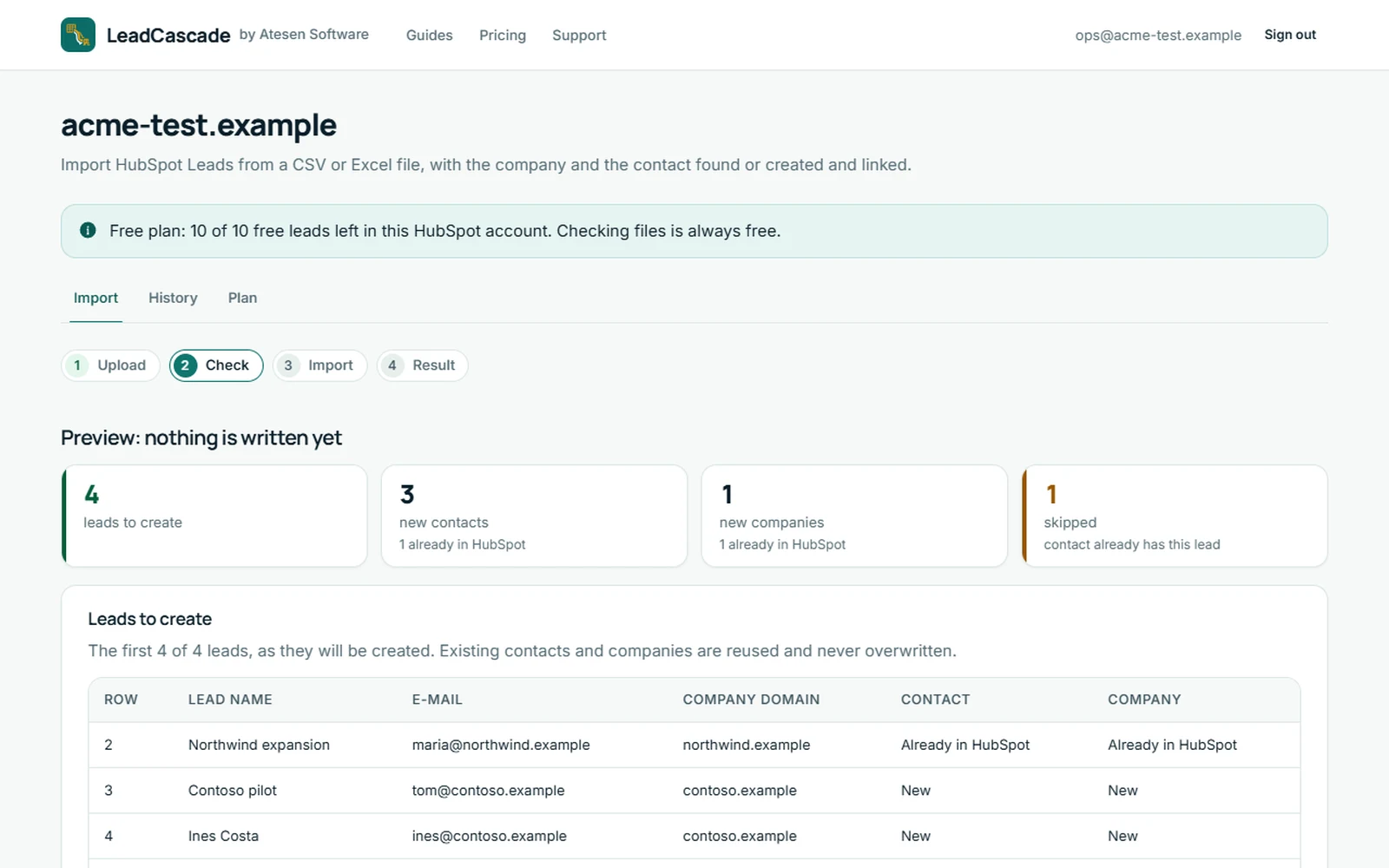
- Free preview. It shows how many leads, new contacts and new companies the run would create, which rows are skipped because the contact already has a lead with that name, and every row with a problem, with its row number and reason. Nothing is written.
- Typed confirmation. Nothing reaches HubSpot until you type IMPORT and the number of leads. Running the same file twice creates nothing twice.
- Result file and 30-day undo. A result CSV lists every row with its lead, contact and company ids. Undo deletes the leads that run created; contacts and companies it created stay and are marked in the CSV.
- Sign-in on HubSpot's page. LeadCascade never sees your HubSpot password and asks for contacts, companies and leads (read and write) and owners (read).
It creates new leads only. It does not update existing leads, import deals or tickets, or enrich data, and it needs the leads object, so Sales Hub Professional or Enterprise. It is not listed in HubSpot's app marketplace.
Disclosure. Atesen Software, which publishes this guide, makes LeadCascade. HubSpot's own steps above work without it.
Price. The preview is free and unlimited, and the first 10 leads are free, once per HubSpot account. The pass is $29, one-off for 7 days, for up to 3,000 leads in one HubSpot account with no renewal. Monthly is $49 per month with unlimited leads, and you can cancel at any time. Prices are in US dollars and exclude tax; see the pricing page for the current terms.
Which route fits
- A short list that all sits at one stage: HubSpot's two steps. They cost nothing beyond your plan.
- A file whose rows carry their own lead name, stage or owner: one run that reads those columns, such as LeadCascade, or several batches in HubSpot, one per stage.
- Contacts, companies or deals only, or very large files: HubSpot's own import, which is built for that.
Three routes side by side: LeadCascade vs Insycle vs HubSpot import. Other HubSpot guides, for tickets and exports, are on the guides page.
Atesen Software is independent. HubSpot is a trademark of HubSpot, Inc., and this page is not affiliated with, sponsored or endorsed by HubSpot, Inc. The three HubSpot articles were checked on 15 November 2026; menus and plans can change.
Questions about this guide: support@atesensoftware.com.
Questions people ask
Can you import leads into HubSpot?
Yes, in two steps. Import the people as contacts with HubSpot's import tool, then select them on the Contacts index and click Create leads. HubSpot's import articles do not name the Leads object as something you import from a file.
How do I create leads in bulk from contacts in HubSpot?
On the contacts index page, select the checkboxes next to the contacts, click Create leads at the top of the table, and choose the lead pipeline, stage, type and label in the right panel. It needs an assigned Sales seat.
Which HubSpot plan do I need for leads?
HubSpot's Create leads article lists Sales Hub Professional or Enterprise, and a Super Admin has to activate the leads object in the data model first.
Does a lead need a contact or a company in HubSpot?
Yes. HubSpot says a lead cannot exist on its own; it must have a primary association with a contact or a company. One contact can have several leads, for example one per product line.
Can one file create the company, the contact and the lead together?
Not with HubSpot's import alone, going by its import articles: a multi-object import links contacts and companies, and the leads come afterwards. LeadCascade, a separate web app, creates all three from one CSV or Excel file, with a free preview first.