How to unapprove a bill in Xero
Xero has no Unapprove button for bills. To get an approved bill back to a draft, either edit it in place, or void it and copy it to a new bill.
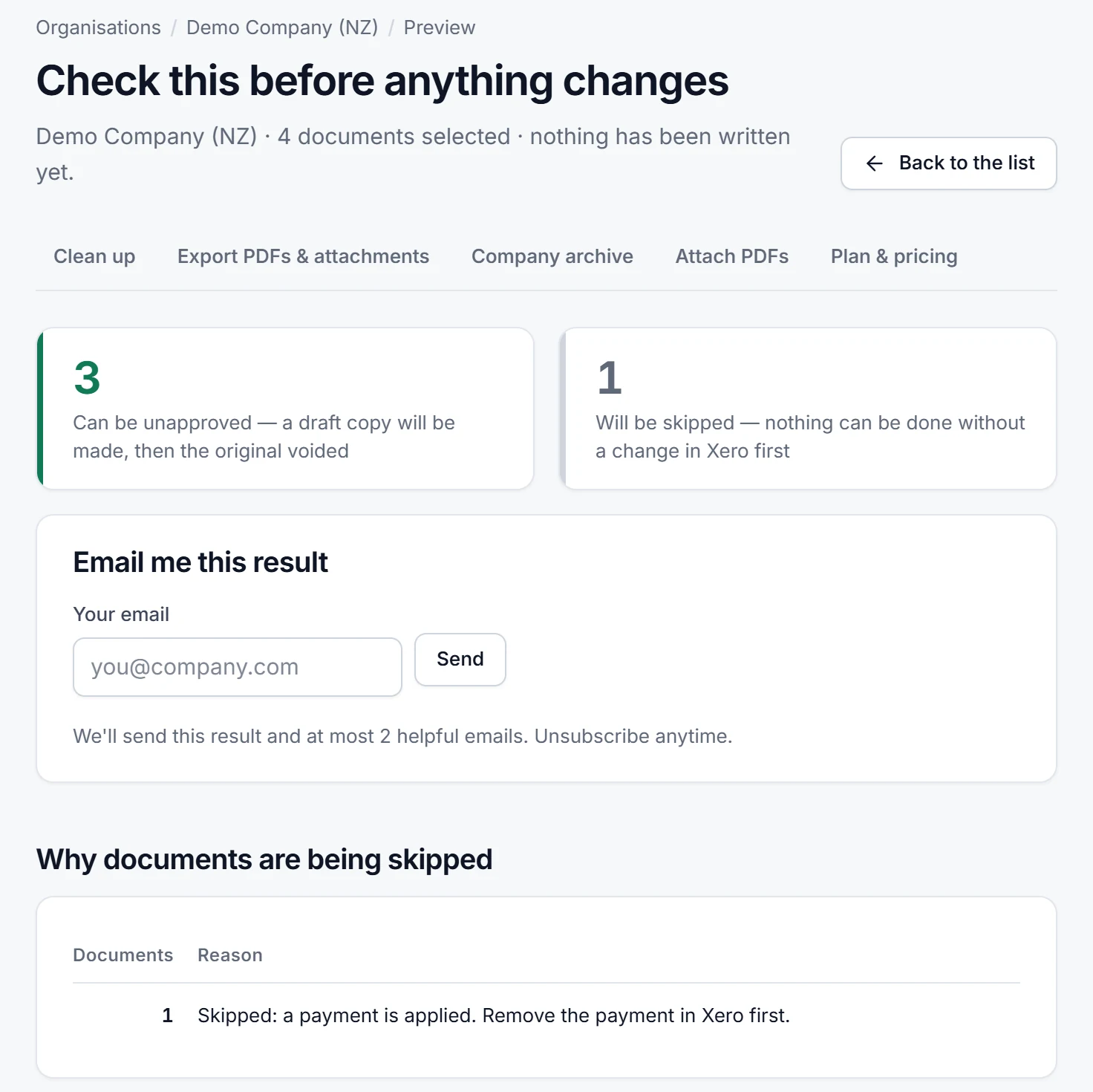
For a batch of approved bills, Unapprove shows what would happen to each one before anything changes. The preview writes nothing to Xero. Atesen Software, which publishes this guide, makes Unapprove.
Can you unapprove a bill in Xero?
Not today. The request Bills - Option to unapprove on Xero Product Ideas had 681 votes when we checked, with the status Accepted. Even so, Xero's community manager wrote on 20 November 2025 that "it's not in our roadmap atm", because the pages in Bills need updating first.
On 15 February 2024 Xero floated a workaround: one action that voids the bill, copies it and reattaches any files, for one bill at a time. On 5 August 2024 it wrote that it would not move forward with that solution.
First, check whether you need a draft at all
An edit is often enough. Per Xero Central's Edit bills, open Purchases > Bills > Awaiting payment, open the bill, click Edit, change it and click Save. If no part-payment or credit note is applied, you can edit any field.
A paid bill is more limited. You cannot edit the Tax Rate field, but you can edit fields that do not affect the total, among them contact details, reference, account code, description and tracking. To change anything else, remove the payment first, one payment from one bill at a time. If the bill came from a repeating template, an edit changes only that bill.
If you need a separate draft: void, then copy
This is the sequence Xero described in 2024. A void cannot be reversed, so go in order. These steps follow Xero Central.
- Remove any payment. A paid bill must lose its payment first. Open the bill, click the payment line, then Options > Remove & Redo. A payment deleted this way cannot be restored, and its bank statement line stays so you can reconcile it again (Delete an invoice or bill payment).
- Void the bill. Open Purchases > Bills > Awaiting Payment, open the bill, click the menu icon, select Void and click Yes, void (Delete or void a bill). Xero advises checking tax implications with your accountant or bookkeeper first.
- Find it again. On the All tab click Filter and tick Deleted & voided.
- Copy it to a new bill. The same article says a voided bill cannot be restored, but you can copy it to a new bill. It gives no click-by-click copy steps, so we give none.
- Check the copy against the original. Compare the supplier, dates, reference, lines, tax rates and total. Xero's 2024 workaround reattached files to the copy, so check attachments too. Save the copy as a draft, one of the choices Add bills lists for a new bill.
What can get in the way
- A lock date. Users cannot add or edit transactions dated on or before it, though they can still create draft bills. An administrator can remove it temporarily under Accounting settings > Financial settings (Set up or remove lock dates).
- Your user role. Xero says your role decides whether you can delete or void bills.
When one by one stops working
Bills have an advantage over sales invoices here. Xero Central says you can void awaiting payment bills in bulk: on the Awaiting Payment tab tick each bill, click Void, then Continue to void [number] items. For invoices, Delete or void an invoice says you cannot void awaiting payment invoices in bulk.
That covers only half the job. The articles we read describe no bulk copy, so each bill still needs its own copy and check. After a sync or an import approves dozens of bills, a reference or an attachment can get lost.
Option: Unapprove
Unapprove is a web app that runs this copy-and-void routine on a batch. You connect an organisation, choose approved invoices and bills, and see a preview of every result before anything changes. Each eligible document gets a separate draft copy with the supported attachments, then the original is voided; if the copy fails, the original is left as it was. A sales invoice keeps its number: the original is renamed with a -V suffix and the draft takes the number.
It skips, and lists with the reason, any document with a payment applied, an allocated credit note or a date inside a locked period. You type the number of documents to confirm, and a CSV backup is made first.
For the same routine across a batch, with more detail, see the Unapprove guide Bulk unapprove invoices and bills.
Disclosure. Atesen Software, which publishes this guide, makes Unapprove. The manual steps above work without it.
Price. Preview is free. The free trial costs $0, needs no card and processes 3 documents within 14 days. Monthly is $39 per connected organisation. The Clean-up Pass is a one-off $49 for 30 days with unlimited documents and no renewal. Prices exclude tax.
More detail: about Unapprove and its own site.
Which route fits
- A wrong detail and nothing paid: edit the bill.
- One or two bills that must be drafts: void, then copy by hand. Sales documents follow the same routine, see how to unapprove an invoice in Xero.
- A batch: Unapprove.
To catch a wrong account before a bill is approved, see how to check the account code on Xero bills awaiting approval.
Atesen Software is independent. Xero is a trademark of Xero Limited, and this page is not affiliated with or endorsed by Xero. The statements from Xero Central and Xero Product Ideas were checked on 12 November 2026. Menus and options can change.
Questions about this guide: support@atesensoftware.com.
Questions people ask
Can you unapprove a bill in Xero?
No. The Product Ideas request has 681 votes and the status Accepted, but on 20 November 2025 Xero's community manager wrote that it is not on the roadmap at the moment.
How do I revert an approved bill to draft in Xero?
Remove any payment, void the bill, then copy it to a new bill and check the copy. If only a detail is wrong, edit the bill instead.
Can I void bills in bulk in Xero?
Yes for awaiting payment bills. Tick them on the Awaiting Payment tab and click Void. Xero Central says awaiting payment sales invoices cannot be voided in bulk.
Can I restore a voided bill in Xero?
No. Xero says a deleted or voided bill cannot be restored, but you can copy it to a new bill.
How do I unapprove many Xero bills at once?
Unapprove, made by Atesen Software, creates a draft copy of each selected bill or invoice, copies supported attachments and voids the original. Documents with a payment, an allocated credit note or a locked period are skipped and listed with the reason.