How to see how long Jira issues spend in each status
Atlassian's own pages describe no Jira Cloud report that lists how long each issue spent in each status. You get a control chart, an average gadget, the changelog and an automation recipe, and an app can build the table for a whole project.
What Jira Cloud does on its own
Everything here is from Atlassian's pages, which we read on 13 November 2026.
- Control chart. Atlassian's control chart page says it applies to company-managed spaces only. It plots cycle time or lead time, one dot per work item, with the average and the standard deviation. You choose the statuses that count as working time. The page describes printing through the browser and names no export.
- Average Time in Status gadget. Atlassian's dashboard gadgets page lists it with one line: it displays the average number of days work items have spent in status. A neighbouring gadget counts how many times work items have been in a status.
- Other gadgets. The Created vs Resolved and Resolution Time gadgets do not split time by status.
- JQL. The JQL operators page describes WAS and CHANGED for the Assignee, Fix Version, Priority, Reporter, Resolution and Status fields. The status example is
status CHANGED FROM "In Progress" TO "Open". These operators find work items. The page describes no duration. - REST changelog. The Get changelogs endpoint,
/rest/api/3/issue/{issueIdOrKey}/changelog, returns every change to one issue, oldest first, in pages set by startAt and maxResults. You need the Browse projects permission.
Atlassian's suggestion JRACLOUD-63103, "Way to collect exact time a issue spend in a workflow (Time in status)", was unresolved and in Gathering Interest on 13 November 2026. It was created in November 2016.
The manual route, step by step
Atlassian's knowledge base article Calculate the time spent on each status and total time on a work item in Jira Cloud, updated on 6 July 2026, builds the numbers with Jira automation. It is the closest thing to a built-in answer.
- Create two Date Time custom fields, one for when a work item enters a status and one for when it leaves.
- Create a Number field for each status you want to measure, plus one for the total.
- Add every field to the issue screens. Atlassian warns that a field missing from a screen fails to update without an error.
- Import Atlassian's example rule. It runs when a work item transitions, stamps the entry and exit times, uses the changelog to find the status the work item left and adds the minutes to that status field.
- Replace the example's status names and status IDs with yours. You find an ID in the URL behind the Edit link on the global statuses page.
- Move a test work item through each status and check that the minutes and the total add up.
For one issue, you can read the changelog and subtract each status change time from the next.
Where it runs out
- One workflow at a time. Atlassian's example is built for one support workflow, with fixed status IDs and a hard-coded Sydney time zone. Each new status needs its own field and rule edits.
- No project table. The rule fills fields on each issue. Per-status totals for a project still mean a filter, an export and a spreadsheet.
- Past issues. The rule fires on transitions. The article describes no back-fill for issues that already moved.
- Status categories. The rule stores minutes per status. Adding them up as To Do, In Progress and Done is left to you.
- Date ranges. JQL can pick issues by when a status changed. The pages we read describe no way to count only the time inside a range.
- Exports. The control chart page names no export and the gadget page describes none.
Option: StatusTime for Jira Cloud
Disclosure: Atesen Software makes this app. The manual steps above work without it.
StatusTime is an Atlassian Forge app that works with company-managed and team-managed software, service and business projects. You pick a project, a date field (created, resolved or updated), a date range and, if you like, issue types. It reads the status history from the Jira changelog.
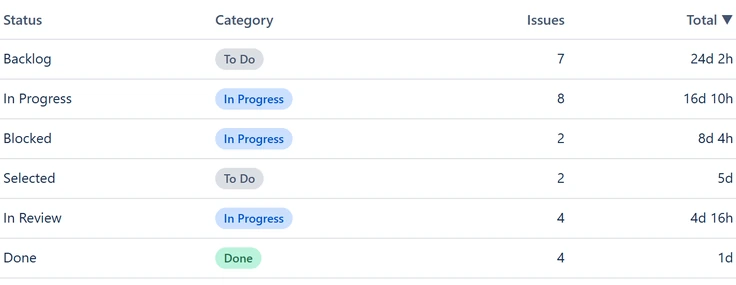
- Time in status. For each status you get the total, average, median and maximum across the issues.
- Lead time and cycle time. Lead time runs from created to resolved. Cycle time runs from the first move into an In Progress category status to resolved. Time is also added up by status category.
- Workflow audit. It counts reopens and backward moves and lists the unresolved issues that have sat longest in their current status.
- Calendar or business hours. Choose a 24/7 clock, or set a time zone, working weekdays and working hours. Public holidays are not excluded.
- CSV export. You can download a per-issue file and a per-status file, with durations in decimal hours.
- Read-only. It asks for one scope, read:jira-work, reads as the signed-in person and stores nothing.
Good to know. A report covers at most 1,000 issues and a date range of at most 24 months. Lead time and cycle time exist only for resolved issues. The app is newly listed and has no public review history yet. It is a paid app, so running a report needs an active licence. See the Marketplace listing for pricing and trial. More on the app is on its product page.
Which route fits
- A trend of cycle time for one board: the control chart.
- One issue, once: its changelog.
- One fixed workflow that you will maintain: Atlassian's automation rule.
- Per-status totals for a project, with business hours and a CSV: an app.
Atesen Software is independent. Atlassian and Jira are trademarks of Atlassian, and this page is not affiliated with or endorsed by Atlassian. The Atlassian pages and the Jira suggestion cited here were checked on 13 November 2026. Menus and options can change.
Questions about this guide: support@atesensoftware.com.
Questions people ask
Does Jira Cloud show time in status natively?
Only in part. Atlassian documents a control chart and an Average Time in Status gadget, and the pages we read describe no per-issue table of time in each status. Suggestion JRACLOUD-63103 was in Gathering Interest on 13 November 2026.
How do I see the average time in status?
Atlassian's dashboard gadgets page lists an Average Time in Status gadget that displays the average days work items have spent in status. StatusTime shows the total, average, median and maximum for each status across a project and date range.
What is the difference between cycle time and lead time in Jira?
On its control chart page, Atlassian counts lead time from when a work item is logged until it is completed, and cycle time as the time spent working on it. StatusTime measures lead time from created to resolved and cycle time from the first move into an In Progress category status to resolved.
Can JQL tell me how long an issue was in a status?
No. The WAS and CHANGED operators find work items that had or changed a status, and the page describes no duration. Use the changelog, an automation rule or an app to get the time.
Does StatusTime change my Jira data?
No. It requests the read:jira-work scope, reads as the signed-in person and stores nothing. Atesen Software operates no server for it.