How to find missing receipts in Xero
Xero has no report or filter that lists the bills and spend money transactions without an attachment. The built-in way is the bills list: in the Purchases menu, select Bills, set a date range and read the files column row by row. Spend money transactions have to be opened one at a time. For a whole period at once, ReceiptHollow lists every gap in one exportable list.
Need the list for a month or a year? ReceiptHollow, our web app for Xero, lists up to 50 missing-attachment items free on the first scan. Start your free first scan
The steps in Xero Where they stop
What Xero offers today
What the Xero Central articles on bills, search, reports and files describe:
- The bills list has a files column. Xero's article on searching sales and purchase transactions says you can sort results by any column heading except the currency or files columns. You can search by contact, reference or amount, set start and end dates, and filter by status, but none of the filters it lists is about attachments.
- The reports have no attachment column. The Payable Invoice Detail report and the Account Transactions report let you choose columns, group and filter, then export to PDF or a spreadsheet. The column and filter options they describe do not include attachments.
- Spend money shows a file icon. To see a file on a purchase order or a spend or receive money transaction, Xero says to click the file icon in the transaction.
How to check bills for missing attachments in Xero
These steps use only what the Xero Central articles above describe.
- Open the bills list. In the Purchases menu, select Bills, then select the All tab or the status tab you want to check.
- Set the period. Enter a Start date and an End date, then choose the Date type, such as the issue date.
- Show more rows. At the bottom of the list, click the arrow next to Items per page and select up to 200 items.
- Read the files column. Note each bill that has no file. The column cannot be sorted, so the gaps are spread through the list.
- Attach what you find. Open the bill and drag the receipt onto it, or add it from the document library (Attach a file to a transaction).
For spend money transactions, open each one and check its file icon. The articles we read describe no list of spend money transactions with a files column.
Where the built-in way stops
- No list to send. The gaps are noted by hand. Nothing in the articles exports only the bills without a file.
- Two places to check. Bills are in one list and spend money transactions are opened one by one.
- Smart Document Capture works the other way. It starts from a file you upload and looks for a transaction with the same date and amount (About Smart Document Capture). It does not tell you which transactions still lack a receipt.
- The document library inbox shows loose files. A file not yet attached to a transaction stays in the Inbox (Organise your document library): receipts without a transaction, not the reverse.
Option: ReceiptHollow, one list of the gaps
ReceiptHollow is a web app for Xero users. You connect a Xero organisation with access that only reads your accounting data and choose a date range. It reads bills and spend bank transactions page by page and lists the ones whose attachment flag says no file is attached. A missing or unreadable field is flagged as unknown, never counted as a clean result.
- Filter. By minimum amount, contact name and account. Amounts stay in each document's currency, without conversion.
- Export. CSV or XLSX with type, contact, date, amount, currency, account and reference, or a reminder list with a draft note and blank owner and recipient columns.
- Go back to Xero. Each row links to the original document, so you can attach the receipt there.
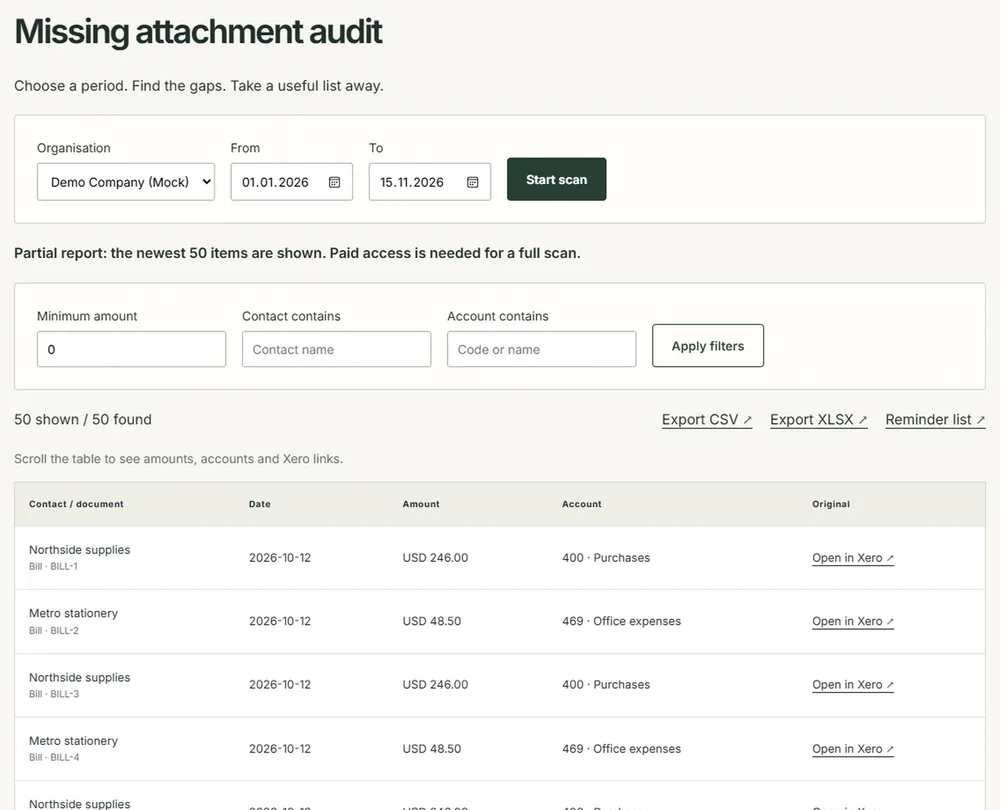
Good to know. ReceiptHollow never uploads a receipt, edits a transaction or sends a reminder, and it does not fetch contact email addresses. An attachment flag cannot prove that a receipt is valid or sufficient for tax, and a bill with an unrelated file will not appear. Sales invoices, transfers and expense claims are outside the scan, and deleted and voided documents are left out. Reports expire after 24 hours.
Price. The first scan lists up to 50 missing-attachment items free, once per organisation; bills are read before spend transactions, and a report that reaches the limit is labelled partial. The 7-day pass is $19, one payment that does not renew. Monthly is $12 a month per organisation, and you cancel in the billing portal. Prices are in US dollars; local VAT/GST is included or added at checkout by Paddle.
Disclosure. Atesen Software, which publishes this guide, makes ReceiptHollow. Xero's own steps above work without it.
Which route fits
- A few bills this month: the files column in the bills list. It costs nothing.
- A quarter or a year before close, bills and spend money together, with a list to send: ReceiptHollow.
- Receipts you already have as files: upload them to the document library and let Smart Document Capture match them.
More Xero guides: find duplicate bills and invoices, see the account code on bills awaiting approval and export all your data from Xero. All of our Xero apps are on the Xero tools page.
Atesen Software is independent. Xero is a trademark of Xero Limited, and this page is not affiliated with or endorsed by Xero. The Xero Central articles were checked on 15 November 2026; menus and options can change.
Questions about this guide: support@atesensoftware.com.
Questions people ask
Is there a missing receipts report in Xero?
Not in the Xero Central articles we checked. The Payable Invoice Detail and Account Transactions reports describe no attachment column or filter. The bills list shows a files column, but it cannot be sorted or filtered by it.
How do I see which bills have no attachment in Xero?
In the Purchases menu, select Bills, set a start and end date, show up to 200 items per page and read the files column. Note each bill with no file, then open it and attach the receipt.
How do I find spend money transactions without receipts?
Open each transaction and check its file icon. The articles we read describe no list of spend money transactions with a files column. ReceiptHollow lists spend bank transactions with no attachment together with bills.
Does Smart Document Capture find missing receipts?
No. It works from a file you upload and looks for an existing transaction with the same date and amount. It attaches receipts you already have; it does not list transactions that still lack one.
Can ReceiptHollow change anything in my Xero file?
No. It connects with access that only reads your accounting data, and it never uploads a receipt, edits a transaction or sends a reminder. You attach the receipts in Xero yourself, using the link on each row.