Check packaging barcode GTINs before print
A linear EAN and a GS1 Digital Link QR can both scan and still identify different products. Compare both decoded GTINs with the approved catalog for each SKU before signing off the artwork.
Two scans, one approved SKU
In this synthetic proof, SKU DEMO-0067 has the correct EAN-13. Its QR is readable but contains the GTIN for DEMO-0042. The scan can open a web page and miss the mistake. A third SKU, DEMO-0099, has no readable QR in the marked area.
Download the sample report (PDF)
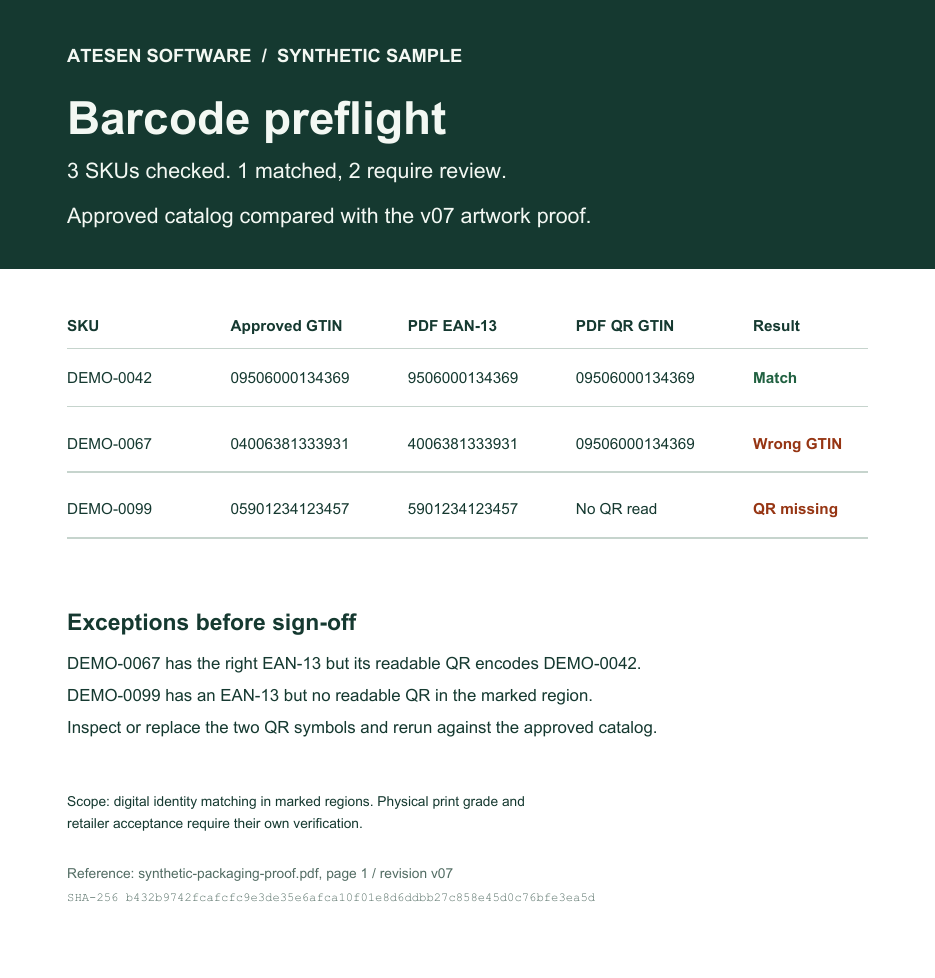
How to compare barcode data before sign-off
- Freeze the catalog and proof revision. Keep SKU and GTIN as text so leading zeros survive the CSV export. Record the proof file, page and revision for each SKU.
- Decode both symbols from the final proof. Read the linear EAN and the GTIN in the GS1 Digital Link QR. In a Digital Link URI, application identifier
01carries the GTIN. For comparison, left-pad the shorter GTIN with zeros to 14 digits. - Record each exception and check the corrected proof. Flag wrong GTINs and missing or unreadable symbols separately. Read both codes again from the new revision after a correction.
For placement, dual marking and printed barcode verification, see the GS1 retail point-of-sale implementation guideline.
Ask about a batch preflight pilot
Atesen Software is scoping a pilot for packaging studios and brand teams. Tell us how many SKUs you have, the file formats you can export and your next proof deadline. We’ll confirm which checks and files we can handle before asking for artwork.
This example covers EAN-13 and GS1 Digital Link QR in marked proof regions. Physical print grade, DataMatrix verification, GS1 allocation and retailer acceptance require separate checks.