Connects to Confluence
How to embed Swagger and OpenAPI documentation in Confluence
Confluence Cloud has no built-in Swagger or OpenAPI macro: neither appears in Atlassian's list of macros available in the editor. Without an app you can paste the YAML or JSON into a code snippet, which shows the text rather than browsable API docs, or attach the file to the page. Rendering it needs a Marketplace app.
Want the definition rendered on the page? See the OpenAPI viewer
Without an app Old Swagger macros
What Confluence Cloud gives you
- No API documentation macro. Atlassian's article What are macros? lists the macros available in the editor. When we checked, none of them was for Swagger or OpenAPI.
- A code block. The article Insert the code block macro says that in the cloud editor you use the code snippet element. It shows source code with syntax highlighting; its documented language list includes JavaScript but not YAML.
- Files on the page. You can attach the definition file to the page so readers can download it.
None of these turns paths and components into operations, parameters and schemas a reader can expand. That is what a Swagger UI style viewer does.
How to put an OpenAPI definition on a page without an app
- Edit the page. Open the Confluence page that documents the API and start editing.
- Insert a code snippet. Type / and choose the code snippet element, or select it from the toolbar's insert list.
- Paste the definition. Paste the YAML or JSON. White space is kept as you pasted it, so indentation survives.
- Add the file. Attach the original openapi.yaml or swagger.json to the page so readers can load it in their own tools.
- Link the live docs. If the API team hosts Swagger UI or another viewer, add a link to it near the top of the page.
It works for a short definition. For a long one, readers scroll through raw YAML, and the page has to be edited by hand each time the API changes.
Pages that still use an old Connect Swagger macro
Swagger docs added to a site some years ago may come from a Connect app. Atlassian's announcement Announcing Connect End of Support: Timeline and Next Steps (17 March 2025) set out three phases: no new Connect apps on the Marketplace from 17 September 2025, no more updates through Connect descriptor changes from March 2026, and Connect entering end of support, with enforcement set for Q4 of calendar 2026. In that last phase apps can keep using Connect modules at their own risk, and Atlassian says Connect integration points may become incompatible over time.
If a Connect app renders your API docs, check its listing for a move to Forge. Moving to another app by hand means opening every page and re-creating every macro.
Option: Atesen OpenAPI & Swagger Viewer for Confluence
Disclosure. Atesen Software, which publishes this guide, makes Atesen OpenAPI & Swagger Viewer for Confluence, an Atlassian Forge app on the Atlassian Marketplace. The steps above work without it.
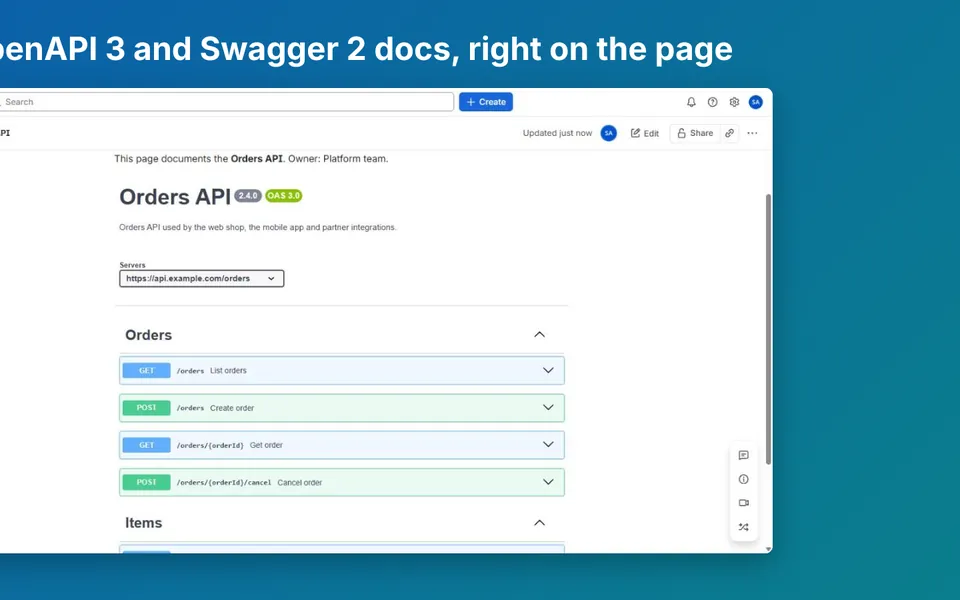
- Three sources. Display YAML or JSON OpenAPI 3 and Swagger 2 definitions from pasted content, a page attachment or a URL, with familiar Swagger UI display options such as operation expansion, sorting and a filter box.
- Migration of legacy macros. An administrator scans the site for supported Connect Swagger and OpenAPI macros, reviews the pages found, unticks any to leave alone and converts them in place. The definition URL, the pasted definition or the attached file name and the display options carry over.
- Report and undo. Download a CSV migration report. Each converted page gets a normal page version, so an undo returns pages to their previous version; a page someone edited after the migration is left as it is and listed in the report. Pages the administrator cannot edit are skipped.
Limits. Try it out is disabled: the viewer documents an API and does not call its operations. Legacy macros that load a definition with a username, password or token need manual attention, such as switching to a page attachment.
Price. Atlassian sells and bills it through the Marketplace, with the trial terms shown on the listing. On 15 November 2026 the listing priced the monthly plan at $1 a month for the 10-user tier; larger sites pay per user, and the listing's Pricing tab shows the price for your user tier.
See the viewer on the Marketplace About the app Documentation
Which route fits
- A small definition that rarely changes: a code snippet plus the attached file.
- Docs that already live in a hosted Swagger UI: link to them from the page.
- Rendered API docs on the page, or pages full of old Connect Swagger macros to move: an app such as Atesen OpenAPI & Swagger Viewer.
More Confluence Cloud guides: how to delete old page versions in bulk and how to copy a space template to another space.
Atesen Software is independent. Atlassian and Confluence are trademarks of Atlassian, Swagger is a trademark of SmartBear Software, and this page is not affiliated with or endorsed by Atlassian or SmartBear. The Atlassian articles, the announcement and the Marketplace price were checked on 15 November 2026; menus and options can change.
Questions about this guide: support@atesensoftware.com.
Questions people ask
Does Confluence Cloud have a Swagger or OpenAPI macro?
No. When we checked on 15 November 2026, neither appeared in Atlassian's list of macros available in the editor. Rendering a definition on a page needs a Marketplace app.
How do I embed Swagger in Confluence without an app?
Paste the YAML or JSON into a code snippet, attach the definition file to the page and link to any hosted Swagger UI. Readers see the text, not browsable API docs.
What happens to Connect Swagger macros after Connect end of support?
Atlassian's March 2025 timeline says apps can keep using Connect modules at their own risk once Connect enters end of support, and that Connect integration points may become incompatible over time. Check whether your app has moved to Forge.
Can the viewer run API calls from Confluence?
No. Try it out is disabled in Atesen OpenAPI & Swagger Viewer: it documents an API and does not call its operations.
Can I undo a macro migration?
Yes. Each converted page gets a normal page version, and an undo returns pages to their previous version, except pages someone edited after the migration, which are listed in the report.