Connects to Jira
Jira attachment file types and size limit: what you can restrict in Cloud
Jira Cloud lets an administrator set the maximum size of each attachment, 1 GB by default and up to 2 GB per file, and decide through permissions who may add or delete attachments. It has no setting that allows or blocks file types: Atlassian closed that suggestion as Won't Fix in July 2024.
Need to block .exe or .svg files in Jira? View trial on Atlassian Marketplace
Change the size limit File types
What Jira Cloud lets you restrict
Atlassian's article Configure file attachments describes these settings. All of them need the Administer Jira global permission.
- Size per file. The default limit is 1 GB per file and the highest you can set is 2 GB per file. The article sets the limit per file; it describes no limit per work item.
- Storage per plan. Free plans have 2 GB of file storage per app, Standard allows up to 250 GB per app, and Premium storage is unlimited.
- ZIP support. When it is on, people can preview the contents of ZIP attachments and download all attachments of a work item as one ZIP file.
- Who can attach. The Create Attachments permission in a permission scheme decides who can attach files in a space, and Delete Own Attachments decides who can remove their own files. Attachments are on by default, and Atlassian says you can disable them altogether.
- The create screen. To let people attach a file when they create a work item, the Attachment field must not be hidden in the field configuration of that work type.
How to change the Jira attachment size limit
- Open the system settings. Choose Settings, then System.
- Open the attachment settings. Select Advanced, then Attachments.
- Edit them. Select Edit Settings to open the Edit Attachment Settings dialog.
- Set the size. In Attachment Size, enter the maximum size per file, up to 2 GB.
- Save. Optionally turn on Enable ZIP Support, then select Update.
To stop a group from attaching files in a space, go to Settings, then Work items, then Permission Schemes, and remove that group from Create Attachments in the scheme the space uses. Every space that shares the scheme changes with it.
File types: what Jira Cloud does not do
There is no allow list or block list for attachment types in the attachment settings above. Atlassian's suggestion JRACLOUD-61024, "Allowlist and Blocklist attachment type in Jira", had 234 votes and was closed as Won't Fix on 31 July 2024. A newer suggestion, JRACLOUD-95267, asks for the same thing and was in the status Gathering Interest when we checked.
The workaround Atlassian gives in JRACLOUD-61024 is an automation rule that checks each attachment name against a regular expression of allowed extensions and deletes the rest. Its own note says the example only covers attachments uploaded to the description. Three things follow from that route:
- The file arrives first. The rule runs after Jira has stored the attachment, so the file is in the work item until the rule removes it.
- It trusts the name. A rule on the extension sees
report.pdf, not what the file really is. - You maintain it. Each list of extensions lives in a rule, and a change has to be made in every rule that holds it.
Option: Attachment Policy Guard for Jira
Disclosure. Atesen Software, which publishes this guide, makes Attachment Policy Guard for Jira, an Atlassian Forge app on the Atlassian Marketplace. The settings above work without it.
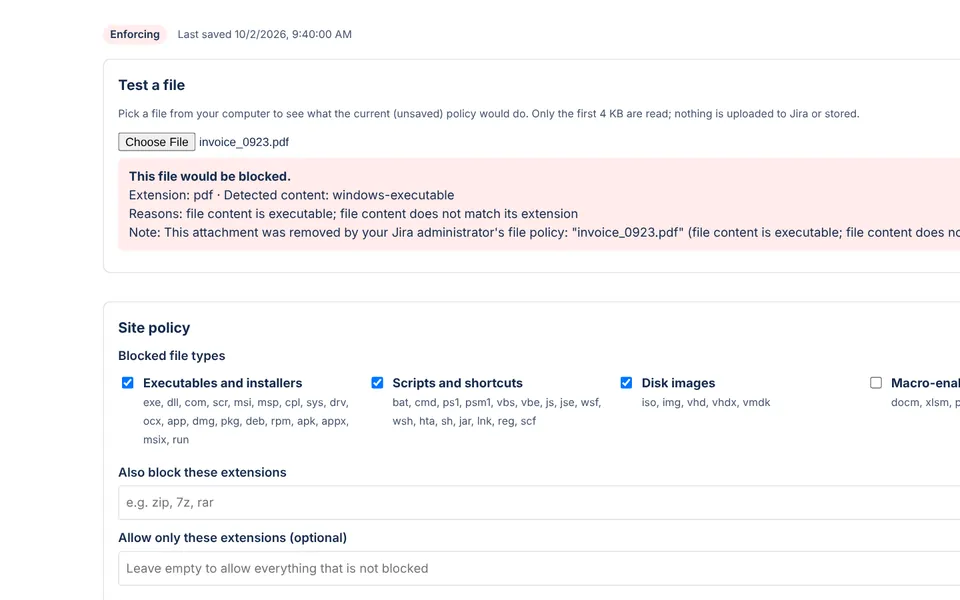
- Rules for the site and per project. An administrator chooses allowed and blocked file types for the site, then adds project-specific overrides, in Jira settings, Apps, Attachment Policy Guard.
- More than the filename. For each new attachment the app reads the name and, when available, the first 4 KB of the file in memory, and can flag a file whose extension does not match its detected signature. The bytes are not stored.
- Report mode first. A new configuration only records matches. An administrator must confirm a switch to enforce mode, which removes a matching attachment and can add a note to its work item. Deletion also needs an active Marketplace licence.
- An audit log. Matching attachments are recorded with name, size, type, decision and action, and administrators can export the records as CSV. Entries are kept for 90 days.
- Where it runs. On Atlassian Forge, with Atlassian-hosted storage and no external network calls.
What it does not do. It cannot block an upload before Jira accepts it: it acts on the attachment-created event. It checks file types and does not scan for viruses or malware. It does not scan attachments that already exist. It is newly published on the Atlassian Marketplace and has no public review history yet, and it has no security certification.
Try it on a test site. Use a harmless PNG in Report only mode. Look for Would remove (report mode) in the audit log and check that the file is still attached. Restore the original policy afterwards.
Price. Atlassian handles billing. Check the current price for your site's user tier on the Marketplace.
View trial on Atlassian Marketplace About the app Documentation
Which route fits
- Files are too large or storage is filling up: the Attachment Size setting, and your plan's storage limit.
- Some people should not attach files at all: the Create Attachments permission in the permission scheme.
- One form or one space needs a few extensions blocked, and you can maintain rules: the automation workaround.
- Site-wide file type rules with per-project overrides, a check of the file signature and an audit trail: an app such as Attachment Policy Guard.
More Jira Cloud guides: how to bulk change the permission scheme in Jira Cloud and how to see how long Jira issues spend in each status.
Atesen Software is independent. Atlassian and Jira are trademarks of Atlassian, and this page is not affiliated with or endorsed by Atlassian. The Atlassian article and the two suggestions were checked on 15 November 2026. The Marketplace trial and pricing links were checked on 21 November 2026.
Questions about this guide: support@atesensoftware.com.
Questions people ask
What is the attachment size limit in Jira Cloud?
The default is 1 GB per file, and an administrator can raise it to at most 2 GB per file under Settings, System, Advanced, Attachments.
Can you restrict attachment file types in Jira Cloud?
Not with a built-in setting. Atlassian closed the suggestion JRACLOUD-61024 as Won't Fix on 31 July 2024. An automation rule can delete attachments by extension after upload, and Marketplace apps such as Attachment Policy Guard check new attachments against allowed and blocked types.
How do I disable attachments in Jira?
Remove the groups and roles from the Create Attachments permission in the permission scheme of each space. Atlassian says attachments are on by default and can be disabled altogether.
Is there an attachment size limit per work item?
Atlassian's article sets the limit per file and describes no limit per work item. File storage is limited per plan: 2 GB per app on Free and up to 250 GB per app on Standard.
Can Attachment Policy Guard stop a file before it is uploaded?
No. It acts on the attachment-created event, after Jira has accepted the file. In confirmed enforce mode, with an active licence, it removes a matching attachment and can add a note to the work item.