Connects to Jira Service Management
Jira audit trail for change requests: what Jira keeps and how to export it
Jira Cloud has no single audit trail for change requests. Its audit log records configuration changes, such as workflows and permission schemes, and Atlassian says it isn't intended to record all activity. Approvals, status history and comments stay on each request, so the evidence an auditor asks for is collected request by request.
Need one evidence pack for a change audit? See AuditPack
Export the audit log What it leaves out
Two different records in Jira
Atlassian's article Audit activities in Jira describes the audit log. It needs the Administer Jira global permission, and it isn't available if all of your Jira Cloud apps are on the Free plan.
- The audit log holds configuration. Its categories include space changes, permission and workflow scheme changes, notification and screen changes, custom fields, sprints, work types and field schemes, plus deleted work items by number. Atlassian says it is intended to record configuration changes that can impact users and spaces.
- The request holds the change itself. When a request reaches a status with an approval step, the approvers approve or decline it, from the help center, from the email or in Slack or Microsoft Teams, as Atlassian's article What are approvals? explains. That decision, the status changes and the comments are kept on the request, not in the audit log.
So for a question like "was every production change in Q3 approved before it was implemented?", the audit log is the wrong place to look.
How to view and export the Jira audit log
- Open the system settings. Select Settings, then System.
- Open the log. Select Audit Log. The log cannot be sorted.
- Check the retention. Select Actions, then Audit Log Settings, choose a retention period such as 6 months and select Save.
- Export. Select Export and confirm by selecting Export again. Up to 100,000 events go into a CSV; with more, the newest are included.
- Filter in a spreadsheet. The export holds all events up to that maximum even if you filtered the page, so filter the CSV afterwards.
The audit log is also available through the REST API, which Atlassian lists for exporting it.
Collecting change evidence by hand
For the request side, the work is manual: list the change requests for the period, open each one, and copy who approved it and when, when it moved into implementation, the comments and the linked incidents. Where that stops:
- It does not scale. Fifty changes a month is several hundred requests a year, each opened and copied by hand.
- Gaps are easy to miss. An approval completed after implementation started, or a change approved by the person who raised it, only shows when someone compares the two dates or names.
- No proof the file is unchanged. A spreadsheet assembled by hand carries no checksum, so neither side can show later that it was not edited.
Option: AuditPack for Jira Service Management
Disclosure. Atesen Software, which publishes this guide, makes AuditPack, an Atlassian Forge app on the Atlassian Marketplace. The steps above work without it.
- Choose the scope. A service project, the date to filter on (created, resolved or last updated) and a range of at most 24 months. Include change requests only, choosing which issue types count, or every request.
- Build the pack. For each request: approvals (who decided, when), status history, comments marked public or internal, the attachment list (names, sizes and types, never file content), linked issues and SLA outcomes.
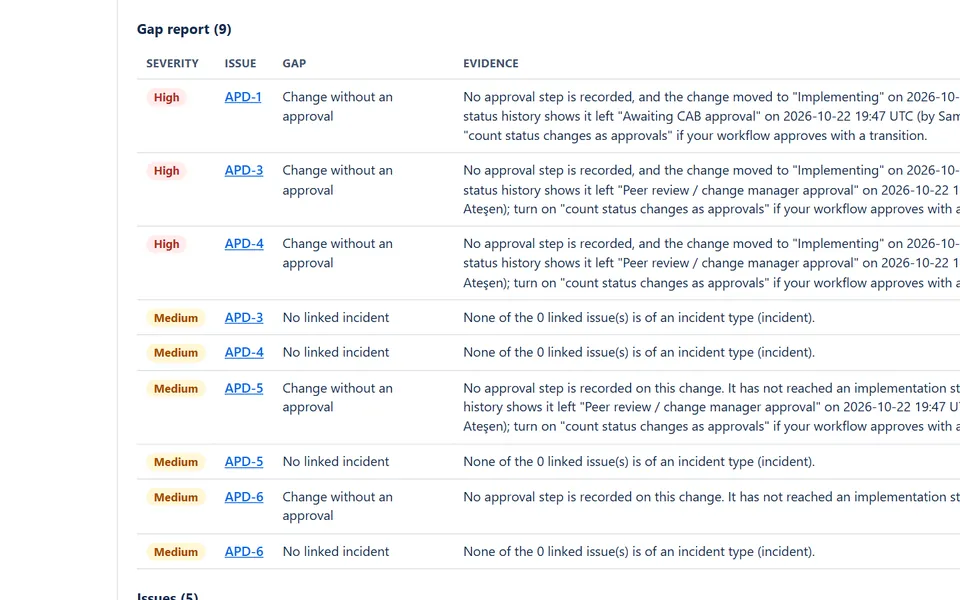
- Read the gaps. Six rules flag, for example, a change without an approval, an approval completed after implementation started, or an approval by the person who raised the change. Each gap states the evidence it rests on; a gap is a fact to explain, not a finding of non-compliance.
- Download the files. A PDF report, a gap-report CSV, and a ZIP with one CSV per evidence type, evidence.json, README.txt and SHA256SUMS.txt with the SHA-256 checksum of every file.
How it handles your data. AuditPack only reads your data: every Jira read runs as the signed-in person, so a pack holds only what that person may see, and it never writes to Jira. It stores nothing; your browser builds the files and saves them to your device. It runs on Atlassian Forge with no external network calls.
Limits. At most 1,000 issues and 24 months per pack. Attachment contents and custom fields beyond the standard issue fields are not included. Jira records one completion time per approval step, not one per approver. A pack does not prove that a control worked and is no substitute for the auditor's judgement. It has no security certification.
Price. Atlassian sells and bills it through the Marketplace, and building a pack needs an active licence or the free trial. On 15 November 2026 the listing priced the monthly plan at $14.55 a month for the 10-user tier; larger sites pay per user, and the listing's Pricing tab shows the price for your user tier.
See AuditPack on the Marketplace About the app Documentation
Which route fits
- Who changed a workflow, a permission scheme or a field: the Jira audit log and its CSV export.
- A handful of change requests for one question: open each request and read its approvals and history.
- A change audit over a quarter or a year, with gaps and checksums: an app such as AuditPack.
For SLA evidence on the same requests, read how to report SLA performance in Jira Service Management and export it. For time spent in each status, read how to see how long Jira issues spend in each status.
Atesen Software is independent. Atlassian, Jira and Jira Service Management are trademarks of Atlassian, and this page is not affiliated with or endorsed by Atlassian. The Atlassian articles and the Marketplace price were checked on 15 November 2026; menus and options can change.
Questions about this guide: support@atesensoftware.com.
Questions people ask
Does Jira have an audit trail?
Jira Cloud has an audit log of configuration changes, such as workflows, permission schemes and custom fields. Atlassian says it isn't intended to record all activity in Jira. The history, approvals and comments of a request stay on the request.
How do I export the Jira audit log?
Select Settings, then System, then Audit Log. Select Export and confirm. Up to 100,000 events go into a CSV file; with more, the newest are included.
Where are change approvals recorded in Jira Service Management?
On the request. Approvers approve or decline a request when it reaches a status with an approval step, and the request then moves on in its workflow.
Is the Jira audit log available on the Free plan?
No. Atlassian says the audit log isn't available if all of your Jira Cloud apps are on the Free plan.
Does AuditPack change anything in Jira?
No. It only reads your data, as the signed-in person, and never writes to Jira. It stores nothing; your browser builds the PDF, CSV and ZIP files and saves them to your device.