Connects to Xero
Xero won't let me void or edit an invoice in a locked period
If Xero won't let you void, edit or copy an approved invoice, check its date first. Xero has two lock dates. One stops everyone except advisers. The year-end one stops everyone. A document dated on or before the lock date that applies to you can't be changed, voided or copied into that period. Fix it in one of two ways. If the period is really closed, use a credit note dated in the open period. If the lock was set too early, ask the person who owns the books to move it.
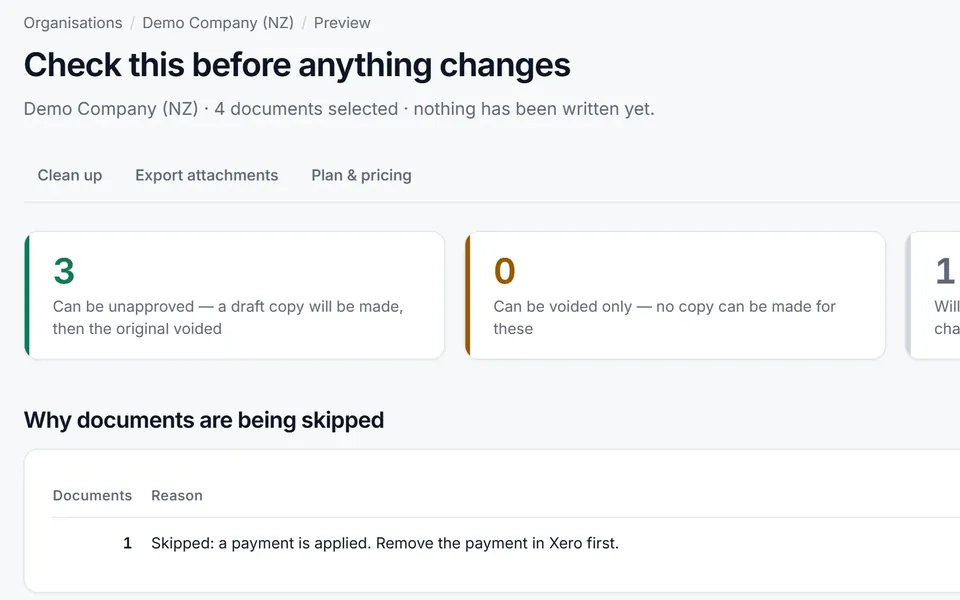
Check which invoices are locked, free Check the lock date
Unapprove is a Xero app by Atesen Software, the publisher of this guide. The free preview lists every selected invoice that a lock date stops, with the reason, and changes nothing.
What you see, why, and what to do
| What you see | Likely cause | Fix in Xero | When the fix runs out |
|---|---|---|---|
| Void, edit or copy refused on an old invoice | Its date is on or before a lock date | Credit note in the open period, or have the lock moved | You have dozens of invoices across several months |
| An adviser can change it, you can't | The lock that stops everyone except advisers | Ask an adviser, or the owner, to make the change | The adviser is outside your company and slow to reply |
| Nobody can change it, not even the adviser | The year-end lock | Credit note dated in the open period | Reopening means redoing a filed return |
| Void missing on a recent invoice | Not a lock: a payment, an overpayment or a credit note is applied | Remove the payment first (void steps) | Hundreds of paid invoices |
Check the lock date
- In Xero, open your organisation settings, then Advanced settings and Financial settings. Both lock dates are shown there.
- Compare them with the date on the invoice you can't change. If the invoice date is on or before the lock that applies to you, the lock is the cause.
- Find out why the period is locked. Usually it has been reported: a VAT or GST return, a set of accounts, or a month-end close someone signed off.
With standard user access you can't move a lock date yourself. The organisation owner or the adviser has to do it.
Credit note or move the lock?
- The period is reported: use a credit note. Raise a credit note dated in the open period against the wrong invoice. The filed return and the closed accounts stay as they are. Reopening the period would change figures someone has already reported.
- The lock was set too early, or nothing was filed: move it. Ask the person who owns the books to move the lock date back. Then void or fix the invoices, and ask them to set the lock again.
- A payment sits in the locked period. The payment can't be removed until the lock is moved either. Fix the difference with a credit note so the bank side stays untouched.
Many invoices: see which ones are locked before you start
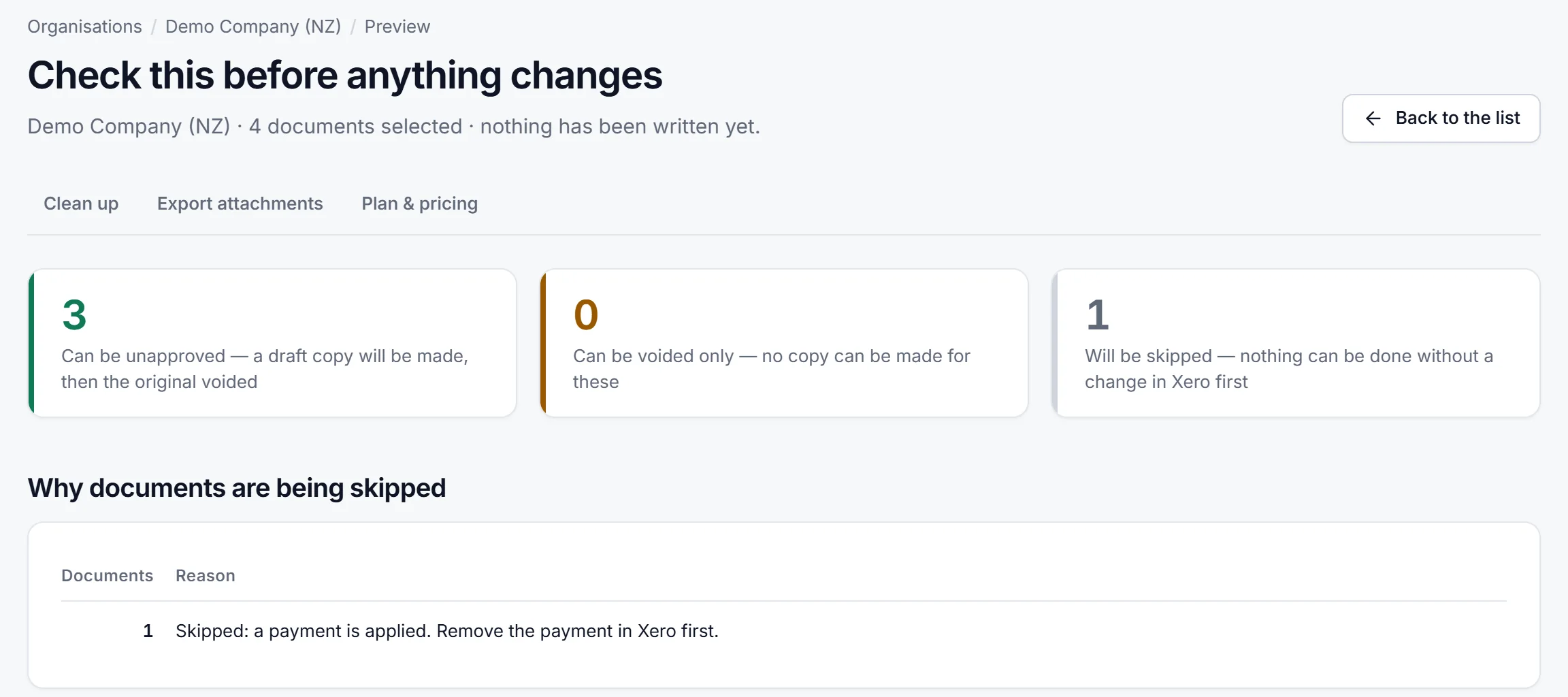
The lock is enforced by Xero for every app and every user, Unapprove included. What Unapprove changes is the order of work. You pick the invoices or bills by filter, or by pasting their numbers, and the free preview sorts them before anything is written. You see which can be voided, which can be unapproved to a draft copy, and which are skipped with the reason: locked period, payment applied, allocated credit note or archived contact. Then you ask your adviser to move the lock once, for the right dates, and run the rest in one batch.
- Free: unlimited preview, and 3 documents in a 14-day trial. No card needed to connect.
- Clean-up Pass: $49 once for up to 1,000 documents in 30 days, $99 up to 5,000, $199 above that, per organisation, excluding tax. With code FOUNDING40 until 30 November 2026 the $49 pass is $29.40.
- Monthly: $39 per organisation, or $290 a year, excluding tax. FOUNDING40 takes 40% off the first payment.
- Refund: full refund within 14 days if you have not processed a document with that payment (refund policy).
Connect Xero and get the $49 pass (FOUNDING40: $29.40) Or start the free preview
Prices from Unapprove pricing, checked 16 November 2026.
Questions people ask
Why won't Xero let me void an invoice?
There are two common causes. Either the invoice date is on or before a lock date, or a payment, overpayment or credit note is applied to it. Check the lock dates under Advanced settings, Financial settings. If the date is open, look for a payment line at the bottom of the invoice and remove it first.
Can I void an invoice in a locked period in Xero?
Not while the lock applies to you. Someone with the right access has to move the lock date first. If the period has already been reported, a credit note dated in the open period is usually the better fix.
Who can change the lock date in Xero?
The organisation owner, or an adviser, depending on your access. Standard users can't move it. The year-end lock stops everyone until it is moved.
Should I move the lock date or use a credit note?
Use a credit note if the period has been reported, for example in a filed VAT or GST return. Move the lock only if it was set too early or nothing has been reported for that period yet.
Can an app void invoices in a locked period?
No. Xero enforces the lock for every app. Unapprove's free preview lists the locked invoices with the reason before anything runs, so you can have the lock moved once for the right dates.
More Xero help: how to void an invoice, deleting an approved invoice, voiding hundreds of invoices, Unapprove vs Bulk Void vs Bulkdozer, done-for-you clean-up.
Atesen Software is independent and not affiliated with Xero. Xero is a trademark of Xero Limited, and this page is not endorsed by Xero. Menus and options can change.
Questions about this guide: support@atesensoftware.com.