Connects to QuickBooks Online
Migrate QuickBooks Online to Xero: what moves, and how to keep your attachments
Yes, you can convert QuickBooks Online to Xero. In the US, Xero offers a free conversion by Q2X for eligible new customers, bringing over contacts, the chart of accounts, invoices, bills and journals. Xero's own page says attachments are set up again in Xero, so download them from QuickBooks Online before you switch.
Attachment Bundler only reads your data, and the preview needs no card. Atesen Software, which publishes this guide, makes it.
What Q2X moves, and what it leaves
Xero's US page Convert from QuickBooks, checked on 15 November 2026, describes the conversion. The free migration by Q2X is for eligible new Xero customers moving from QuickBooks Online, confirmed in a free consultation. On what comes across, Xero's answer is plain: "Items like attachments, budgets and bank rules are set up again in Xero."
| Data | With the Q2X conversion |
|---|---|
| Contacts and chart of accounts | Move over, with all-time history |
| Invoices, bills, payments and journals | Move over |
| Multi-currency and sales tax | Move over |
| Payroll | Historical payroll bank data moves; W2 information is not converted |
| Attachments | Set up again in Xero |
| Budgets and bank rules | Set up again in Xero |
Xero's preparation list also asks you to note the attachments, budgets and bank rules you will set up again. Outside the US, Xero's conversion offer and partners differ by country; check Xero's page for yours.
How to download your QuickBooks Online attachments before you convert
Steps 2 to 4 come from Intuit's article Export your QuickBooks Online data, checked on 15 November 2026.
- Decide what you need. List the periods, vendors and accounts whose receipts you must keep.
- Open the Attachments list. In QuickBooks Online, go to Settings and, in the Lists column, select Attachments.
- Select the files. Tick the attachments you want to export.
- Export a ZIP. Select the Batch actions dropdown, then Export. QuickBooks Online downloads the selected attachments as a ZIP file.
- Keep the ZIP as your archive. Store it outside both systems before you cancel QuickBooks Online.
- Attach what you use in Xero. Once the conversion is done, attach the files you need day to day to the converted transactions in Xero.
Where the built-in ZIP stops
- Ticked by hand. Intuit's article describes selecting files. It does not describe filtering the Attachments list by transaction date, vendor, account or amount.
- No link to the transaction. It does not describe naming files after their transactions, or a list of which transaction each file belongs to, which is what you need to find the matching bill in Xero.
A named archive with an index: Attachment Bundler
Attachment Bundler is a web app made by Atesen Software for bookkeepers and accountants on QuickBooks Online. You sign in with Intuit, filter and see the counts before downloading. It only reads your data and never changes your books. It does not upload anything to Xero.
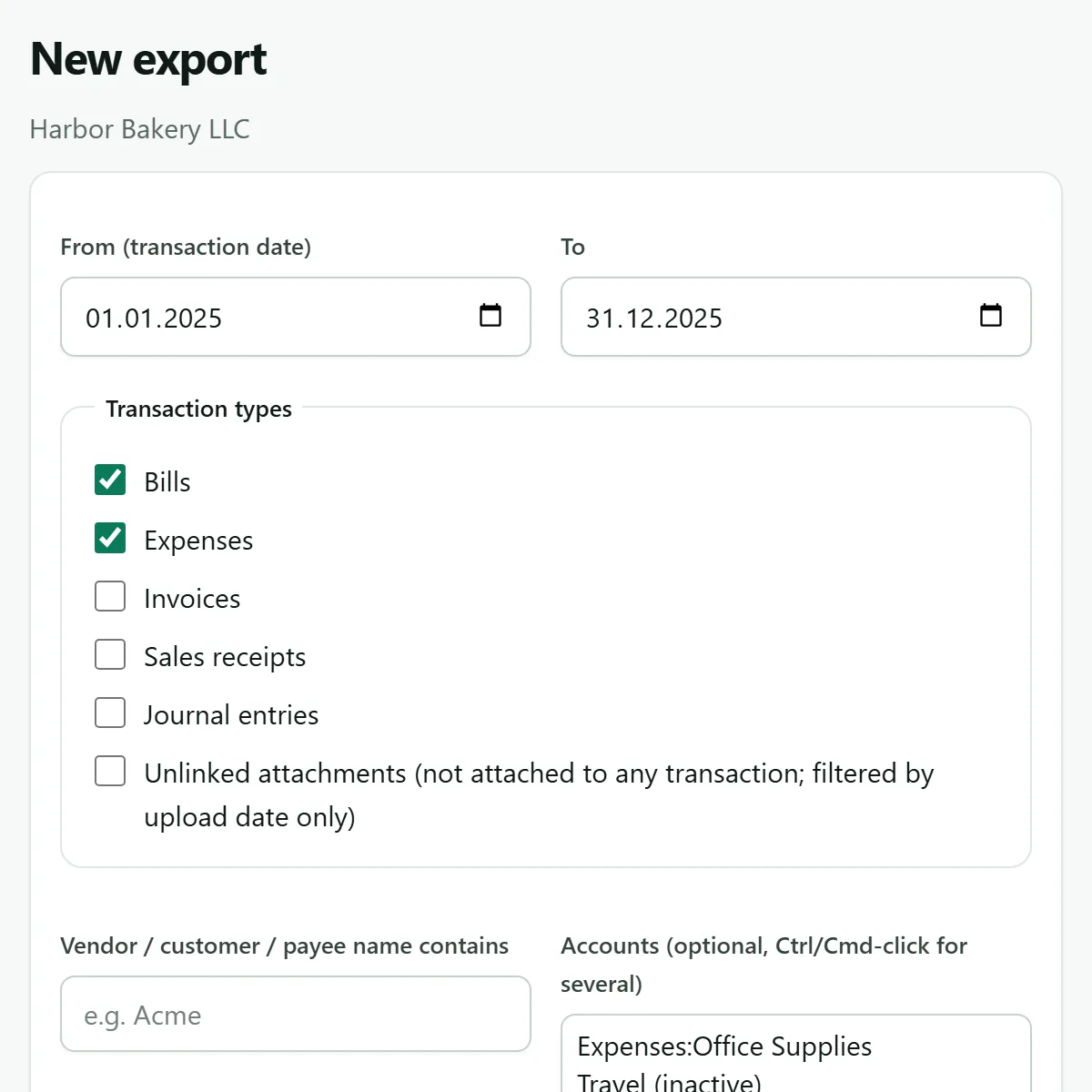
- Filter first. Transaction date range, transaction type (bills, expenses, invoices, sales receipts and journal entries), vendor, customer or payee name, one or more accounts, and a minimum and maximum amount.
- Counts before downloading. The free preview shows, for each type, the matching transactions, files and megabytes, and how many have no attachment.
- Named and sorted. Each file is named after its transaction, such as 2025-03-14_Acme Supplies_1250.00_B-1043.pdf, in folders by type and month, by vendor or customer, or flat.
- An index for the new system. A CSV and an Excel index list every file with its path, its transaction and its status, and also the matching transactions with no attachment. That makes each converted transaction easy to find in Xero.
- Large companies. Big exports come in ZIP parts, each with its own index, up to 20,000 files per export.
Price. Previews and counts are free and unlimited, and the first 25 files per company are free with the full index. The Year-end Pass is one payment for 30 days with no renewal: $29 for up to 250 different files, $49 up to 1,000, $99 up to 5,000, $199 above that, as on the pricing page. Monthly is $19 a month for up to 250 different files a month. Both cover up to 10 companies, with checkout by Paddle. Until 30 November 2026, the founding offer FOUNDING40 takes 40% off the 250-file pass or the first Monthly payment, applied at checkout.
Good to know. Intuit offers no read-only QuickBooks Online permission, so sign-in asks for its single accounting permission; the app sends read requests only. Vendor credits, bill payments, deposits, estimates and purchase orders are not included, and QuickBooks Desktop is not supported. Files stream to your browser and are never stored. It is not listed in Intuit's app store and has not been certified by Intuit.
Disclosure. Atesen Software makes Attachment Bundler and earns money from its plans.
About Attachment Bundler Preview your counts on its own site
Which route fits
- A few files you can pick by hand: the Attachments list and Batch actions, Export.
- Years of receipts kept by transaction, with an index: Attachment Bundler, before you cancel.
- Estimates, vendor credits and other types Attachment Bundler does not cover: the Attachments list.
- A fresh start instead of a conversion: Xero's page describes entering opening balances and keeping your old QuickBooks records. Download the attachments either way.
More: how to download all attachments and receipts from QuickBooks Online and the three ways to export QuickBooks Online attachments.
Atesen Software is independent. QuickBooks and Intuit are trademarks of Intuit Inc., and this page is not affiliated with, sponsored or endorsed by Intuit Inc. Xero is a trademark of Xero Limited, and this page is not affiliated with or endorsed by Xero. Xero's page and Intuit's article were checked on 15 November 2026; offers and menus can change.
Questions about this guide: support@atesensoftware.com.
Questions people ask
Can you convert QuickBooks to Xero?
Yes. In the US, Xero offers a free conversion from QuickBooks Online by Q2X for eligible new customers, and Q2X checks eligibility in a free consultation. Outside the US, the offer and partners differ by country, so check Xero's page for yours.
Does the QuickBooks to Xero conversion include attachments?
No. Xero's US page says attachments, budgets and bank rules are set up again in Xero. Download the files from QuickBooks Online before you switch and attach the ones you need to the converted transactions.
What data moves from QuickBooks Online to Xero?
Xero's page lists all-time history: contacts, the chart of accounts, invoices, bills, payments and journals, multi-currency and sales tax. Historical payroll bank data moves too; W2 information does not.
How do I download all attachments from QuickBooks Online before switching?
Go to Settings, then Attachments under Lists, tick the files and choose Batch actions, Export for a ZIP. For files picked by date, vendor or account, named after their transactions with an index, Attachment Bundler previews for free and the first 25 files per company are free.
Does Attachment Bundler move files into Xero?
No. It only reads QuickBooks Online and gives you ZIP files with a CSV and Excel index. You keep the archive and attach the files you need in Xero.