Connects to Jira Service Management
Jira bulk change permission: can you limit it in Jira Service Management?
Not in Jira itself. Make bulk changes is a global permission: you grant it to groups for the whole site, not per service space. Provided they have the space permissions, holders can edit, move, delete or transition many work items at once, up to 1,000 per edit. Jira cannot limit it to one approved change.
Let agents run only approved bulk changes? See Approved Bulk Actions
Grant the permission Where it stops
What the permission does
Atlassian's article What are global permissions, and what do they control? says global permissions apply across the entirety of your site and are granted to groups. For Make bulk changes it says that, provided they have the necessary space permissions, users with it can:
- edit, move, or delete multiple work items at the same time;
- transition multiple work items at one time through a workflow.
The space permissions still apply to each work item. Atlassian's article Edit multiple work items says you can edit fields in up to 1,000 work items at the same time, and its table lists, for each field, the permission the current user needs for all the selected work items, such as Edit work item for Priority or Assign work item for Assign To.
How to grant the Make bulk changes permission
These steps are from View, grant, revoke global permissions in Jira and need the Administer Jira permission.
- Open the system settings. Select Settings, then System.
- Open Global permissions. Select Global permissions in the sidebar to see who holds each permission.
- Choose the permission. In the Grant Permission section at the bottom of the page, choose Make bulk changes.
- Choose the group. Pick the group, such as a group of your service desk agents. Avoid Anyone, which gives the permission to any user who can access your site.
- Save. Select Add. To take it back later, find the permission in the list and select Delete under the group name.
Where the global permission stops
- It is all or nothing. The permission is granted for the site. An agent who holds it and can edit requests in five service spaces can bulk change requests in all five, not only in the queue you had in mind.
- It is not tied to one change. Jira's bulk edit lets the holder choose any field they are allowed to edit and any value. There is no setting for "agents may only shift the due date by a week" or "only add this label".
- No dry run. The bulk edit flow ends with a confirmation screen before Jira saves, and the article describes no sample of current and new values or undo.
- The record is per work item. The steps describe no single report of one bulk run that you can hand to a team lead.
If you keep the permission with administrators instead, they do the bulk work for agents on request, which is slow when the same change comes up every week.
Option: Approved Bulk Actions for Jira Service Management
Disclosure. Atesen Software, which publishes this guide, makes Approved Bulk Actions, an Atlassian Forge app on the Atlassian Marketplace. The steps above work without it.
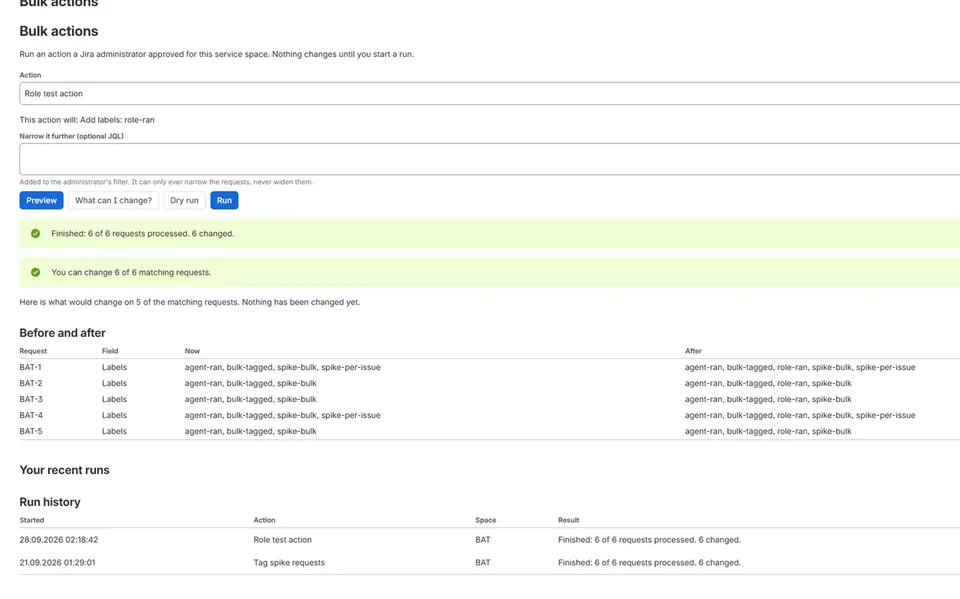
- An administrator saves the change. In Jira settings, Apps, Approved Bulk Actions: a name, the service spaces it may touch, an optional JQL filter, the most requests one run may change (never more than 1,000) and the groups or project roles allowed to run it.
- It sets what changes. Assignee, priority, labels added or removed, components, single and multiple choice fields, a relative shift of a date field, request participants, or a comment as an internal note or a reply to the customer.
- An agent runs it from the queue. In the service space, Queues, Bulk actions. Only actions approved for that agent in that space are listed. The agent's own JQL is added to the administrator's filter, so it can only narrow the set.
- Preview and dry run first. Preview counts the matching requests with Jira's own count and refuses a run over the limit. A dry run shows current and proposed values for a sample of real requests. Neither writes anything.
- The run is checked and recorded. Before any request is changed, the app asks Jira which ones the agent may browse and edit; the rest are skipped and named. Runs go in batches on Atlassian's queue, can be stopped between batches, and each request's outcome is recorded. Administrators can export any run as CSV.
Limits. One run at a time per person. No duration is promised: throughput depends on Jira and its rate limits. A person starts every run; there are no scheduled runs. It is built for Jira Service Management only. It runs on Atlassian Forge with no external network calls, and it has no security certification.
Price. Atlassian sells and bills it through the Marketplace, with the free trial Atlassian offers. On 15 November 2026 the listing priced the monthly plan at $20 a month for the 10-user tier; larger sites pay per user, and the listing's Pricing tab shows the price for your user tier.
See Approved Bulk Actions on the Marketplace About the app Documentation
Which route fits
- Only administrators do bulk work: keep Make bulk changes with the administrators group.
- Trusted agents who need any bulk edit in every space they work in: grant the permission to their group.
- Agents who should run a few known changes, in named spaces, with a preview and a record: an app such as Approved Bulk Actions.
More Jira Service Management guides: add organization or group members as request participants and report SLA performance and export it. Changing permission schemes rather than global permissions is covered in how to bulk change the permission scheme in Jira Cloud.
Atesen Software is independent. Atlassian, Jira and Jira Service Management are trademarks of Atlassian, and this page is not affiliated with or endorsed by Atlassian. The Atlassian articles and the Marketplace price were checked on 15 November 2026; menus and options can change.
Questions about this guide: support@atesensoftware.com.
Questions people ask
Is the Jira bulk change permission global?
Yes. Make bulk changes is a global permission. It applies across the whole site and is granted to groups, not per space.
How do I give someone bulk change permission in Jira Cloud?
Select Settings, then System, then Global permissions. In the Grant Permission section, choose Make bulk changes and the group, then select Add.
Can a user with bulk change permission edit any work item?
No. Atlassian says users with it can bulk edit, move, delete or transition work items provided they have the necessary space permissions, and each field needs its own permission for all the selected work items.
How many work items can you bulk edit at once in Jira?
Atlassian's article says you can edit fields in up to 1,000 work items at the same time.
Can agents bulk edit requests without the global permission?
Not with Jira alone. Approved Bulk Actions lets an administrator approve a named change for specific service spaces and groups, and agents run only that change, within their own Jira permissions, after a preview and a dry run.