Connects to Xero
Email many Xero invoices at once, drafts included
Sendtide approves and emails many Xero sales invoices in one confirmed job, after a free check that every invoice has a recipient and nothing blocks it. The first 10 invoices are free, then $19 for a 7-day pass or $12 a month. For invoices that are already approved, Xero's own Awaiting Payment tab can email the ones you tick.
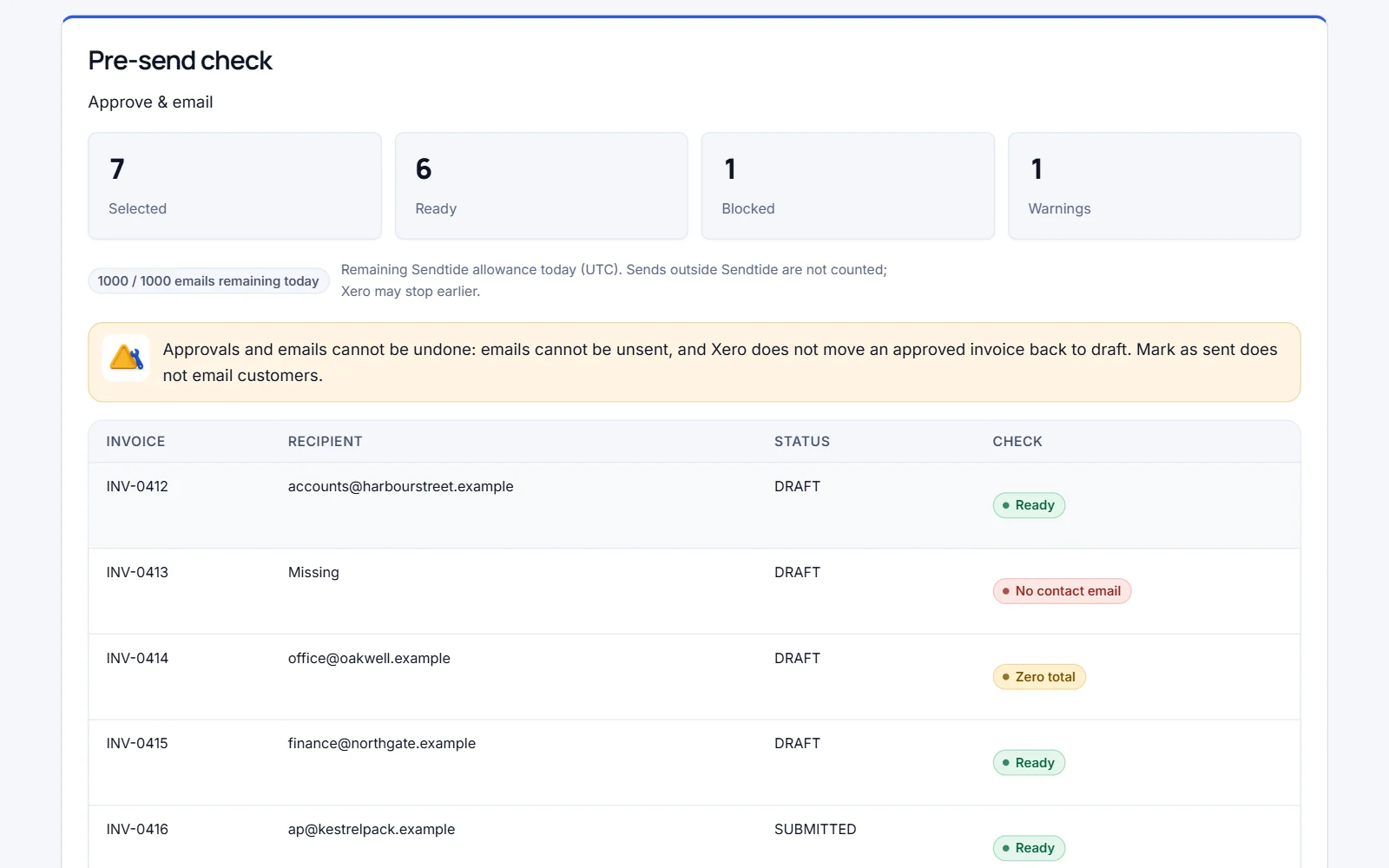
Run the free check with Xero Xero's own way
Sendtide is a web app by Atesen Software, the publisher of this guide. Connecting, loading and the check change nothing in Xero.
Xero's own way: the Email button on approved invoices
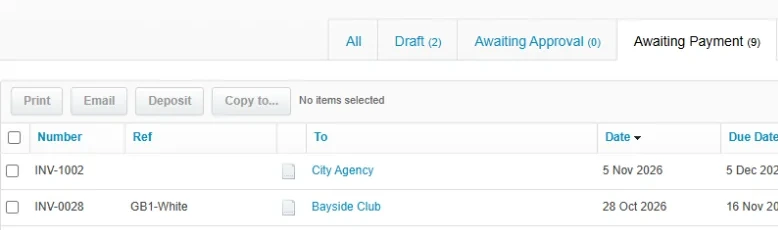
In a Xero Demo Company, the Awaiting Payment tab of the Invoices list has Print, Email, Deposit and Copy to buttons above the list. Tick the approved invoices and click Email to send them with your invoice email template. For a list that is already approved and checked, this is free and the right tool.
Where Sendtide comes in
- The invoices are still drafts. A sync, an import or a month-end run left them in Draft or Awaiting Approval. Sendtide approves and emails them in the same job, or approves and marks them as sent without emailing.
- Some contacts have no email address. The free check flags each invoice as ready, blocked or with a warning, such as a missing contact email or a zero total, before anything is sent.
- You need a record. Each invoice gets its own result, there is a result CSV to download, and results stay in History for 30 days.
How to approve and email many Xero invoices with Sendtide
- Connect the organisation. Sign in on Xero's own page and load your draft or approved, unsent sales invoices.
- Select the invoices. Choose Approve and email, or Approve only, which marks them as sent without emailing.
- Run the free check. Every invoice is marked ready, blocked or warning. The check writes nothing to Xero.
- Type SEND and the ready count. Only the ready invoices are processed, up to 1,000 in a job.
- Download the result CSV. It lists the outcome for every invoice. Emails that may not have gone out are not retried automatically.
Price. Connecting, loading and the check are free, and so are the first 10 invoices processed in each organisation; failed and skipped rows do not count. Then $19 for a 7-day pass or $12 a month, before tax (pricing page).
Good to know. Approvals and emails cannot be undone. Xero does not move an approved invoice back to draft, and an email cannot be unsent. Xero sends no invoice emails from its Demo Company, so emailing was not tested there.
Questions people ask
How do I send many approved Xero invoices by email at once?
Open Invoices, go to the Awaiting Payment tab, tick the invoices and click Email. To approve drafts and email them in one go, with a check that every contact has an email address first, use Sendtide: the first 10 invoices are free, then $19 for a 7-day pass or $12 a month.
Can I approve and email draft invoices in bulk in Xero?
Sendtide approves draft and awaiting approval sales invoices and emails them in one confirmed job, after a free pre-send check. It can also approve and mark them as sent without emailing.
What happens to invoices with no contact email?
Sendtide's check marks them as blocked and leaves them out of the job, so you can add the address in Xero and run them later.
Can I undo a bulk send?
No. An email cannot be unsent, and Xero does not move an approved invoice back to draft. To reverse an approval, the invoice has to be voided. That is why the check runs first.
Does Sendtide confirm the customer received the email?
No. It reports what Xero accepted for sending. Xero's sent flag does not confirm delivery to the inbox.
Sources, read on 26 November 2026: Sendtide pricing and its guide bulk approve and email invoices in Xero; the Xero toolbar from a Xero Demo Company.
More: Sendtide in our catalogue, approved too early? bulk unapprove invoices.
Atesen Software is independent. Xero is a trademark of Xero Limited, and this page is not affiliated with or endorsed by Xero. Menus and options can change.
Questions about this guide: support@atesensoftware.com.