Connects to Xero
Tools to apply credit notes in bulk in Xero, compared (2026)
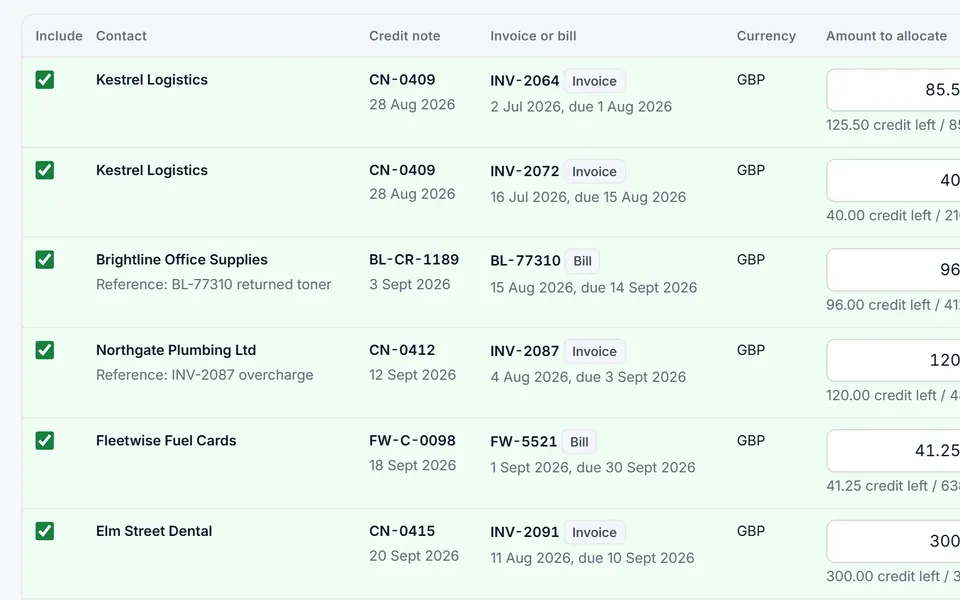
Xero allocates credit notes one at a time, which is free but slow for a long list. To match many credit notes to open invoices and bills in one run, use Creditloom ($29 once for up to 1,000 allocations) or BulkOps ($29 per 1,000 items), both with a preview and undo, or Allocat, which also matches prepayments and overpayments. If supplier credits only matter inside bill payment runs, Batchly applies them there.
The five options side by side
| Tool | What it matches | Price and free trial | Limits | Good fit for |
|---|---|---|---|---|
| Xero (built in) | One credit note at a time: open it and allocate it to invoices or bills of the same contact | Included in Xero | No bulk allocation. The request has 500 votes; on 19 September 2025 Xero wrote that it "isn't planned for the short term" (Xero Product Ideas, 27 November 2026) | A few credit notes |
| Allocat | Credit notes, prepayments and overpayments to invoices; suggests matches by amount, then date | Not shown on its Xero App Store listing on 27 November 2026 Free: Not stated on the listing | Limits not stated on the listing | Credits of several kinds, not only credit notes |
| Batchly | Applies supplier credit notes inside a supplier payment run, then builds the bank file | CAD 25 a month (Xero App Store, 27 November 2026) Free: 21 days | Supplier side only, as part of paying bills | Teams that pay many bills in runs |
| BulkOps | Unallocated credit notes, overpayments and prepayments to open invoices of the same contact; also payment runs, attachment export and tracking archive | $29 once for up to 1,000 executed items in one organisation; larger jobs $29 per 1,000 by email (bulkops.microspear.app, 27 November 2026) Free: First 10 items free, previews unlimited, no card | 72 hours to start jobs after buying a pass; about 1,000 items a day per organisation | A one-off clean-up across several Xero jobs |
| Creditloom | Approved sales and supplier credit notes to open invoices and bills, per contact and currency, with three matching strategies | $29 once for 30 days (1,000 allocations), $29 a month or $290 a year, unlimited (pricing, 27 November 2026) Free: Free scan and on-screen previews; allocations and the preview CSV are paid | Credit notes only; its pages do not cover overpayments or prepayments; speed paced by Xero's daily call cap | A backlog of credit notes, or a monthly routine |
Prices are as the vendors show them, before tax; BulkOps shows "$" without naming a currency. The order is Xero first, then alphabetical; it is not a ranking.
How to choose
- Which credits? Only credit notes: Creditloom. Overpayments and prepayments too: Allocat or BulkOps. Supplier credits while paying bills: Batchly.
- Once or every month? A one-off backlog suits a pass; regular credit notes suit a subscription.
- Can you check before writing? Look for a preview of every match and a typed confirmation. Creditloom and BulkOps both preview first.
- Can you undo? Creditloom undoes its own allocations for 30 days; BulkOps offers one-click undo for finished jobs. Xero allocations by hand are removed one by one.
- Locked periods. Allocations dated in a locked period fail in Xero. Choose a tool that reports them instead of forcing them.
Creditloom: what it does well, and where it stops
Good at: the scan, strategies and preview only read from Xero; you type ALLOCATE and the row count to write; every credit note and invoice is read again before writing, and a changed row is skipped with its reason; locked-period rows are skipped and reported; undo works for 30 days and does not use your allowance.
Where it stops: it matches credit notes only, never across contacts or currencies. Its pages do not cover overpayments or prepayments. It does not move cash or make bank payments. Large runs are paced by Xero's daily call cap.
Questions people ask
Can Xero allocate credit notes in bulk?
No. In Xero you open each credit note and allocate it to invoices or bills of the same contact. Bulk allocation is a request on Xero Product Ideas, and Xero has said it is not planned in the short term.
How do I apply many credit notes to invoices at once?
Use a connected app that previews the matches and then writes the allocations through Xero's API. Creditloom, BulkOps and Allocat all match credit notes to open invoices; check each one's preview and undo before a large run.
Which tool also handles overpayments and prepayments?
Allocat's listing and BulkOps' page both name overpayments and prepayments. Creditloom matches credit notes only.
Is there a free way to bulk allocate credit notes?
Xero's one-by-one allocation is free. Creditloom's scan and on-screen previews are free, and applying allocations needs a pass or a subscription; BulkOps' first 10 items are free.
Can a bulk allocation be undone?
Creditloom can delete the allocations it created in a job for 30 days, after reading each credit note again. BulkOps offers one-click undo for finished jobs. In Xero you remove an allocation from each credit note yourself.