Connects to Xero
Tools to record bulk payments in Xero, compared (2026)
For a short list paid on one day, Xero's own batch deposit and batch payment are free and enough. For a spreadsheet of payments with their own dates and part amounts, use an import tool: Paysweep (payments only, from $19 a month) or SaasAnt Transactions (many transaction types). For remittance advices with hundreds of lines, ToTheCent ($49 to $299 a month) and RemitClear (price on request) match remittance lines to invoices.
The five options side by side
| Tool | What it does | Price and free trial | Limits | Good fit for |
|---|---|---|---|---|
| Xero batch deposit and batch payment | Tick invoices (deposit) or bills (batch payment) and pay them together | Included in Xero | One date and one bank account per batch; at most 50 invoices per deposit; no foreign currency (Xero Central, checked 16 November 2026) | A short list in base currency, paid on one day |
| Paysweep | Records one payment per row of a CSV or Excel file, or from a text remittance PDF, on existing invoices and bills | $19 a month, $39 for 7 days (300 payments) or $199 for 30 days (5,000) (pricing, 27 November 2026) Free: Previews unlimited; recording payments is paid | Xero only; payments only, no invoice creation or bank reconciliation; undo skips reconciled and batch payments | A payment sheet with its own dates and part amounts |
| RemitClear | Reads remittances (PDF, Word, Excel, CSV or email text), matches lines to open invoices and posts payments | One fixed price quoted in a demo; no public price (remitclear.com, 27 November 2026) Free: No trial stated; a demo, and a refund within 30 days per its page | Works with Xero, QuickBooks Online and Sage; large Xero postings are split into batches of 200 | Teams receiving many long remittances |
| SaasAnt Transactions | Imports, exports and deletes many Xero transaction types from files, payments among them | Not shown when we opened its pricing page on 27 November 2026; plans use credits Free: Yes, no card; the Xero App Store listing says both 15 and 30 days | No refunds, per its pricing page FAQ | Projects that also import invoices, bills or journals |
| ToTheCent | Matches one incoming payment on a remittance to many open invoices, then posts a batch payment after you approve | $49 a month (250 lines), $149 (1,500 lines), $299 (multi-organisation) (tothecent.app, 27 November 2026) Free: Send one redacted remittance and see the matches before paying | Xero only; the page says "Launching soon" | One customer paying many invoices at once |
Prices are in US dollars as the vendors show them, before tax. The order is Xero first, then alphabetical; it is not a ranking.
How to choose
- What is your input? Ticked invoices on screen: Xero's batch routes. A spreadsheet: Paysweep or SaasAnt. A remittance advice from a customer: ToTheCent, RemitClear, Paysweep for a text PDF, or our RemitMatch, which reads PDF, Excel or e-mail remittances and records them with the same engine as Paysweep (every remittance previewed free).
- One date or many? A Xero batch has one payment date. A sheet with twelve dates is twelve batches by hand, or one file in an import tool.
- Only payments, or more? If you also import invoices, bills or journals, a broad tool such as SaasAnt covers more. Paysweep records payments and nothing else.
- How do you fix a mistake? Xero has no undo for a batch; you remove the payments one by one. Paysweep undoes eligible payments from a run for 30 days. Check the undo story of any other tool before a large run.
- Price model. A one-off clean-up suits a pass; a monthly flow suits a subscription. RemitClear quotes per team.
Paysweep: what it does well, and where it stops
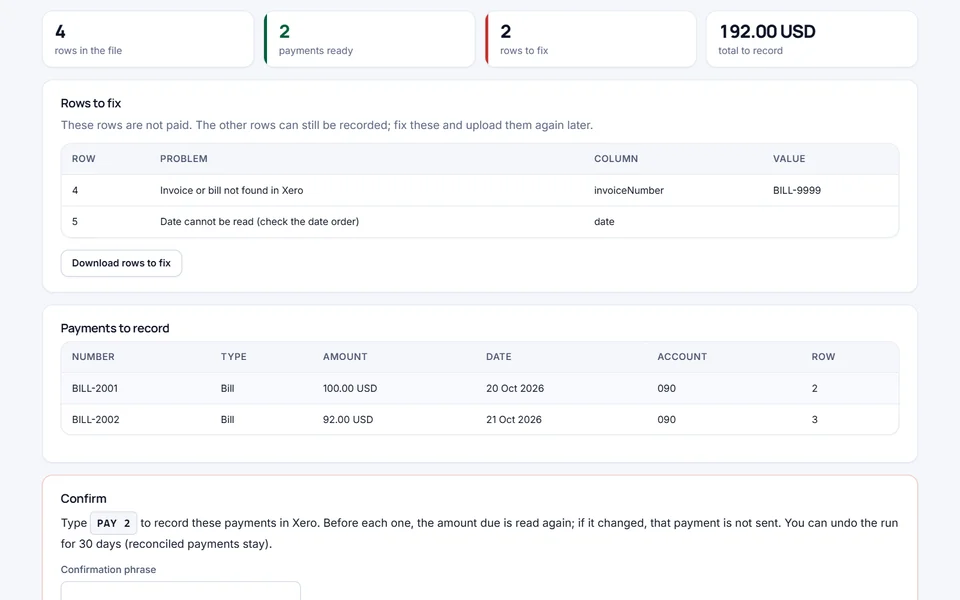
Good at: every row is checked against your Xero organisation before anything is written; rows with a problem are listed with the reason and never sent; you confirm by typing PAY and the count; each payment keeps its own date, amount and account; a result CSV links every invoice; eligible payments can be undone for 30 days.
Where it stops: Xero only. It needs approved invoices or bills that already exist. It does not create invoices, move money or reconcile bank lines. Its remittance reader takes text PDFs, not scans. Undo skips reconciled payments and batch payments.
Questions people ask
Can Xero record many payments at once?
Yes, with a batch deposit for sales invoices or a batch payment for bills. You tick the documents, and the batch gets one date and one bank account. Xero Central gives a limit of 50 invoices per batch deposit and says foreign currency is not available for batches.
How do I import payments into Xero from a CSV?
Xero has no payment import screen. A connected app reads the file and records the payments through Xero's API. Paysweep and SaasAnt Transactions both do this; Paysweep checks every row first and records only the rows you confirm.
Which tool reads a customer's remittance advice?
ToTheCent and RemitClear are built around remittances and match their lines to open invoices. Paysweep reads a text remittance PDF in your browser and matches it to open invoices before you record.
Is there a free way to bulk record payments in Xero?
Xero's own batch deposit and batch payment cost nothing extra. Paysweep's preview is free and unlimited; recording payments needs a pass or a subscription.
Can bulk payments be undone in Xero?
Not as one action in Xero: you remove each payment yourself. Paysweep can undo the eligible payments of a run within 30 days, but it skips payments that are reconciled or part of a batch.